
What is Midjourney?
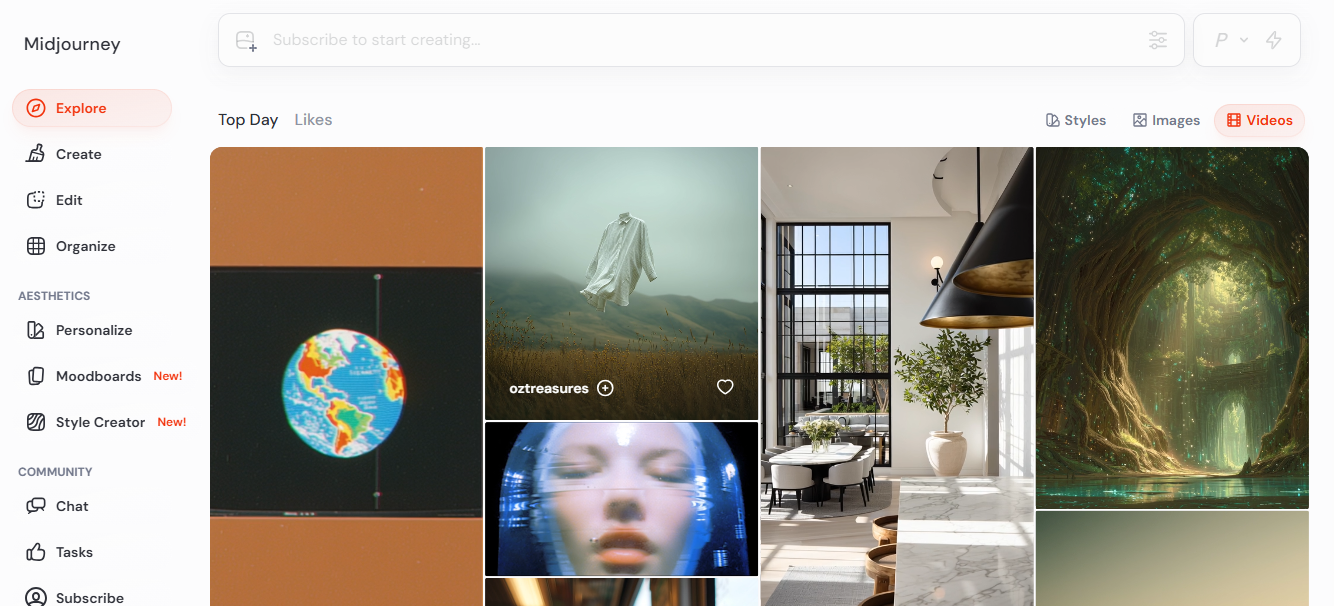
Midjourney is an AI image generator built by a 60-person, bootstrapped research lab in San Francisco that converts text prompts into high-resolution, artistic images. It is used by designers, concept artists, and marketing teams who need distinctive visuals without a traditional design workflow. On the current V8.1 model (default as of June 2026), a single prompt returns four image variations in as fast as 4 seconds, which users then upscale, remix, or animate using the image-to-video feature released in June 2025.
Key Features of Midjourney
- V8.1 as default model with native 2K HD output: V8.1 became the default on June 11, 2026. It generates standard images in 4 seconds and HD images in 12 seconds, rendering natively at twice the size and four times the resolution of V7 images using the hd parameter, with no separate upscaler needed.
- Draft Mode at half the GPU cost: Draft Mode runs at roughly 10x the speed of a standard job and costs half the Fast GPU hours. On V8.1, it returns 24 image thumbnails per batch. Users click Vary on any draft to render it at full quality, making it the go-to tool for moodboarding before spending Fast hours on final output.
- Omni Reference for character and object consistency: Omni Reference lets users upload a photo of a specific person, object, or vehicle and lock it into subsequent generations using the oref parameter. Agencies use it to run the same character across 8 to 10 different ad scenes without re-describing the subject each time. It works alongside Style References, Moodboards, and Personalization.
- Personalization calibrated to 200-image ratings: Users rate approximately 200 images in a 15 to 20 minute session to build a personal aesthetic profile. Once active, every prompt is tuned toward that preference. Style references and moodboards stay consistent between V7 and V8.1, so accumulated style libraries carry forward without resetting.
- Image-to-video generation up to 21 seconds: The V1 video model, released June 2025, animates a static image into four 5-second clips, extendable up to 21 seconds. Users control motion intensity and can apply a text prompt to guide the animation. Video is available through the web interface only and costs roughly 8 times the GPU time of a standard image job.
Pricing
Midjourney has no free plan.
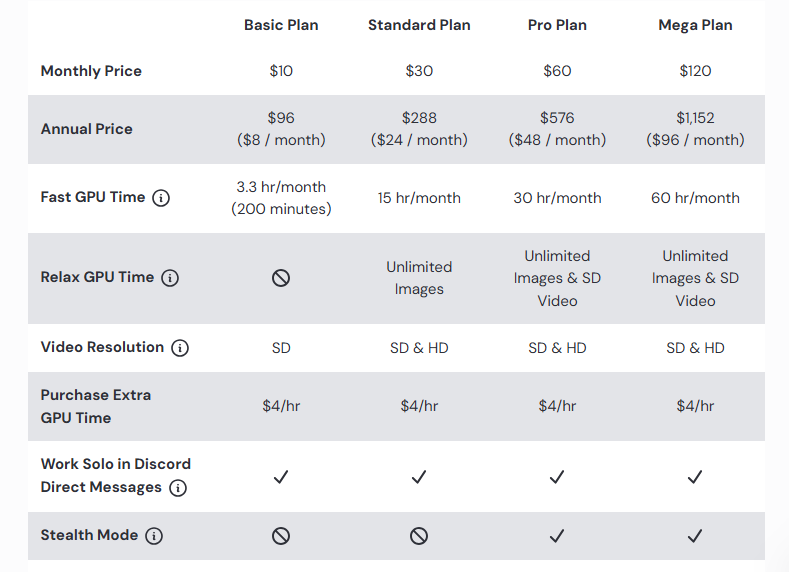
The Basic plan costs $10/month ($8/month annually) and includes approximately 3.3 hours of Fast GPU time, covering around 200 image generations. The Standard plan at $30/month ($24 annually) adds 15 Fast GPU hours plus unlimited Relax Mode image generation with no monthly cap. The Pro plan at $60/month ($48 annually) provides 30 Fast GPU hours and Stealth Mode, keeping outputs private instead of visible in the public community feed. The Mega plan at $120/month ($96 annually) doubles Fast GPU hours to 60.
One cost detail worth knowing: HD generation on V8.1 costs 1.3 GPU minutes per image versus 0.8 minutes for standard resolution. Heavy HD usage on the Basic or Standard plan depletes Fast hours faster than standard generation alone.
Verify current pricing at docs.midjourney.com.
How People Actually Use It
Step 1: Open the web editor and activate Draft Mode. Go to midjourney.com/imagine and toggle Draft Mode on before writing the first prompt. It returns 24 thumbnails per run at half the GPU cost. Most users run 3 to 5 draft prompts here to find a visual direction before spending Fast hours on full-quality generation.
Step 2: Write a subject-first prompt with specific visual parameters. Put the subject at the start, since V8.1 weights early tokens heavily. A prompt like “editorial portrait of a woman in a moss-green trench coat, overcast light, shallow depth of field, shot on 35mm, ar 4:5, style raw” gives the model more to anchor on than a style-led opener. The style raw parameter removes Midjourney’s default polish, useful for product images or realistic scenes.
Step 3: Lock character or object consistency with Omni Reference. Once a draft direction looks right, upload a reference image and rerun the prompt with oref attached. This locks in a specific face, product, or object while letting the background, lighting, and composition vary. Agencies use this to generate 8 to 10 scene variations of the same character without re-describing them each time.
Step 4: Vary or upscale the strongest outputs in HD. Click Vary on the best draft to render it at full quality, then click “Run as HD” to regenerate at 2K resolution. Most users run HD only on their final 2 or 3 candidates, since HD costs 1.3 GPU minutes per image versus 0.8 for standard.
Step 5: Export and finish in Photoshop or Figma. Download final images from the web editor and complete them in your design tool of choice. Common tasks include adding text in Figma, compositing in Photoshop, or feeding an HD image into the video tool for a 5-second animated clip. Midjourney handles concept and visual direction; designers handle typography, layout, and client delivery.
Pros and Cons
Pros
- V8.1 generates standard images in 4 seconds and HD 2K images in 12 seconds, making rapid iteration practical on deadline
- Draft Mode returns 24 image thumbnails at half the Fast GPU cost, so moodboarding a campaign direction does not burn through the monthly hour allocation
- Style references and personalization profiles carry forward from V7 to V8.1, so an accumulated brand style library does not reset on model upgrades
- Omni Reference locks a specific person, product, or vehicle into multiple scene variations without re-describing the subject in each prompt
- Standard plan and above include unlimited Relax Mode image generation, which one social media manager described as enough to generate over 2,000 images monthly by reserving Fast hours only for deadline work
Cons
- Text rendering inside images has been unreliable across multiple model versions; anything beyond a short word in a prominent position typically requires post-processing in Photoshop or Figma
- The Basic plan’s 3.3 Fast GPU hours deplete within two weeks of active use, since a single concept iteration cycle can burn through 10 to 20 generations
- Prompt strategies that worked in V7 do not always carry over to V8.1, so experienced users need to re-test their prompt formulas with each major model update
- Active copyright lawsuits from Disney, NBCUniversal, DreamWorks, and Warner Bros. are headed for trial in late 2026, which creates unresolved legal risk specifically for commercial creative output
- Stealth Mode, which prevents generated images from appearing in the public community feed, is only available on the Pro plan at $60/month and above, meaning client work is publicly visible on lower tiers
Who It’s For
Best fit: Brand designers and creative agencies producing concept art, campaign moodboards, or social visuals at volume, where aesthetic quality and iteration speed justify a paid subscription.
Limited fit: Marketing teams whose deliverables regularly include images with readable text overlays or precise typographic layouts, since text rendering remains inconsistent even in V8.1.
Should avoid: Businesses whose commercial content goes through legal review, given active copyright litigation from major studios with a trial date set for late 2026.
Is Midjourney Worth It?
If you produce concept art, ad campaign directions, or visual content series regularly, the $30/month Standard plan covers most professional workflows. Creative agencies report a 35% improvement in workflow efficiency by using Draft Mode for early concept exploration, then switching to Fast hours only for final renders. For a solo designer replacing stock photo purchases or freelance illustration spend, the math typically works within the first month.
It is not worth it if your primary output involves images with readable text, precise spatial layouts, or commercially indemnified content. DALL-E achieves approximately 95% text accuracy in images versus Midjourney’s inconsistent rendering. Adobe Firefly is the only major generator that provides IP indemnification for commercial work, which matters if your clients or legal team require it.
Alternatives
Midjourney competes most directly with Adobe Firefly on commercial safety, DALL-E on text-in-image accuracy, Leonardo AI on fine-tuning and game asset workflows, and Stable Diffusion on cost and local control; each covering a gap that Midjourney does not fill.
| Tool | Core Strength | Best Use Case | Starting Price | Key Limitation |
| Midjourney | Cinematic artistic output and style consistency across series | Concept art, ad campaigns, social visual series | $10/month | No free plan; active copyright litigation |
| Adobe Firefly | IP indemnification and native Photoshop integration | Commercial content requiring full legal safety | $9.99/month (free tier available) | Artistic output ceiling below Midjourney |
| DALL-E (ChatGPT Plus) | 95% text rendering accuracy; conversational prompting | Social graphics, poster designs, text-in-image work | $20/month | Less distinctive artistic style |
| Leonardo AI | User-trainable models; game asset and character consistency | Game development, character design, 3D asset workflows | $12/month (free tier available) | Fewer fast tokens on lower plans |
| Stable Diffusion | Open-source; runs locally; no recurring subscription cost | Developers needing full model control and unlimited output | Free (self-hosted) | Requires GPU hardware and technical setup |
FAQs
Is Midjourney free to use?
No, Midjourney operates on a subscription-only model with no permanent free tier. The entry plan starts at $10/month, with occasional promotional trials offered to new users at Midjourney’s discretion.
Does Midjourney V8.1 still require Discord?
No. The full web interface at midjourney.com supports all features including image generation, Draft Mode, Omni Reference, and video animation. Discord remains available for community access and support but is no longer required to use the tool.
Is Midjourney safe for commercial use?
Paid subscribers receive general commercial usage rights, with one condition: companies generating more than $1,000,000 USD in gross annual revenue must subscribe to the Pro or Mega plan. Separately, active copyright suits from Disney, NBCUniversal, DreamWorks, and Warner Bros. are scheduled for trial in late 2026, which introduces unresolved risk for high-exposure commercial campaigns.
How does Midjourney compare to Adobe Firefly for a marketing team?
Midjourney produces stronger artistic output and gives more control over mood, composition, and style. Firefly is the better choice if your team submits creative for legal review, since Adobe provides IP indemnification for Firefly-generated content and Midjourney does not. Teams running both tools typically use Midjourney for concept direction and Firefly for production assets that go to final approval.
What is the difference between Relax Mode and Draft Mode?
These serve different purposes. Relax Mode queues your generation behind other users, adding a 2 to 10 minute wait, but produces the same image quality as Fast Mode at no additional GPU hour cost. Standard plan and above get unlimited Relax generations. Draft Mode is a different speed tier entirely: it runs generations at roughly 10x speed, returns 24 lower-resolution thumbnails per batch, and costs half the Fast GPU hours of a standard job. Draft Mode is designed for early concept iteration, not final output.