

What is Pika?
Pika is an AI video generation platform that turns text prompts, images, or existing clips into short, stylized videos through its Pika 2.5 model. It solves the problem of producing scroll-stopping social content without a video editor, letting creators apply physics-based effects like melt, inflate, or explode to any object on screen.
Key Features
- Pika 2.5 model generates text-to-video and image-to-video clips up to 10 seconds at 1080p
- Pikaffects applies 15+ physics-based transformations like melt, crush, explode, and inflate
- Pikaframes chains up to 5 keyframes into a single video up to 25 seconds long
- Pikaswaps and Pikadditions replace or insert objects into existing footage using a text prompt
- Pikaformance animates a still face from an audio file, generating lip-synced clips up to 30 seconds
Pricing
| Plan | Price | Monthly Credits | Pika 2.5 Access | Key Notes |
| Basic (Free) | $0 | 80 | 480p only | Watermark-free, commercial use, rollover credits |
| Standard | $8/month (billed annually) | 700 | All resolutions up to 1080p | Adds Pikaframes, full Pikaffects, fast generations |
| Pro | $28/month (billed annually) | 2,300 | All resolutions up to 1080p | Faster generations, larger credit pool |
| Fancy | $76/month (billed annually) | 6,000 | All resolutions up to 1080p | Fastest generations, highest credit volume |
Credit cost per video (key examples):
| Action | Resolution | Credits |
| Text-to-video / Image-to-video (Pika 2.5, 5s) | 480p | 12 |
| Text-to-video / Image-to-video (Pika 2.5, 10s) | 1080p | 80 |
| Pikascenes (5s) | 1080p | 65 |
| Pikatwists (5s, Pro model) | 1080p | 80 |
| Pikaframes (up to 25s) | 1080p | Up to 200 |
| Pikaffects (image-to-video, 5s) | – | 15 |
Verify current pricing at pika.art/pricing
How It’s Typically Used
A social media manager creating a product launch reel:
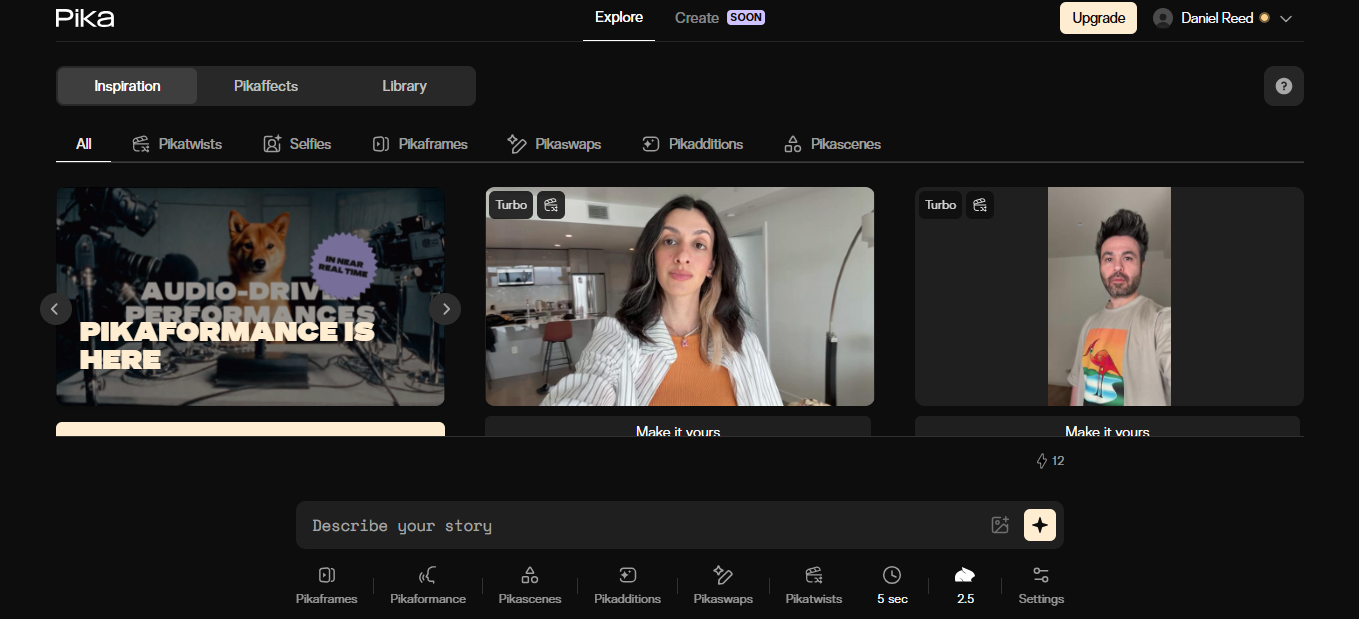
Step 1: Sign in at pika.art, you land on the Explore page with a “Describe your story” prompt bar at the bottom of the screen.
Step 2: Click the image-add icon beside the prompt bar and upload a product photo.
Step 3: Type a scene prompt with camera direction, then confirm Pika 2.5 and 5-second duration from the bottom toolbar.
Step 4: Click the sparkle generate button and your silent MP4 appears in the Library tab in under a minute.
Step 5: Apply a Pikaffect from the bottom toolbar for a transformation, then download and pair with audio in CapCut before publishing.
Pros & Cons
Pros
- Pikaffects produce viral-style transformations that are difficult to replicate elsewhere
- Generation speed is among the fastest in the category, often under 60 seconds
- Free Basic plan allows commercial use and watermark-free downloads
- Standard plan at $8/month undercuts most competitors offering 1080p output
- Supports seven aspect ratios for native posting on TikTok, Reels, and Shorts
Cons
- Outputs are silent. No native audio or voiceover generation in any tier
- Photorealism trails Runway Gen-4.5, Sora 2, and Kling 3.0, especially on faces
- Free tier caps Pika 2.5 at 480p, which looks dated on modern feeds
- Maximum clip length is 25 seconds via Pikaframes, unsuitable for long-form
- Credit system penalizes iteration; failed generations still consume credits
Who It’s For
Social media managers and short-form creators making TikToks, Reels, or product teasers benefit most because Pika rewards creative experimentation over realism.
Photo-real ad teams will find it limited, faces drift and skin textures feel synthetic compared to Runway or Sora.
Filmmakers producing dialogue-driven or long-form content should avoid it, as Pika generates silent clips capped at 25 seconds.
Is It Worth It?
It’s worth the $8 Standard plan if you publish weekly social content and need fast, stylized clips with effects competitors don’t offer. A creator producing 20-30 short videos a month gets clear ROI from the credit allocation and the Pikaffects library alone.
It’s not worth it if you need broadcast-grade photorealism, native audio, or clips longer than 25 seconds. For client ads or cinematic work, Runway Gen-4.5 or Kling 3.0 deliver stronger results despite higher costs.
Alternatives
If Pika doesn’t fit, the three names worth comparing are Runway for cinematic ad work, Kling AI for realism plus native audio, and Luma Dream Machine for longer narrative scenes.
| Tool | Core Strength | Best Use Case | Starting Price | Key Limitation |
| Pika | Physics-based creative effects (Pikaffects) | Short, stylized social content | $8/month (annual) | No native audio; 25-second max |
| Runway | Cinematic quality with Gen-4.5 and 4K output | Professional ads and brand films | $12/month (annual) | Credits drain fast at high resolutions |
| Kling AI | Top-ranked realism and native audio sync | Realistic ads with voice or sound | $6.99/month (annual offer) | Reports of credit and billing issues |
| Luma Dream Machine | Longer narrative clips up to 60 seconds via Ray2 | Multi-shot scenes and storytelling | $30/month (Plus) | Steep jump from free to paid tier |
FAQs
Is Pika free to use?
Yes, Pika offers a free Basic plan with 80 monthly credits, commercial use rights, and watermark-free downloads. Pika 2.5 is restricted to 480p resolution on the free tier.
Does Pika generate audio with its videos?
No, Pika produces silent video clips only. Sound effects, music, and voiceover must be added in a separate editor. This is a known gap versus Kling 3.0 and Google Veo 3.1, which generate synced audio natively.
How long can Pika videos be?
Standard Pika 2.5 text-to-video and image-to-video clips are capped at 10 seconds. Pikaframes extends this to 25 seconds by chaining up to five keyframes together.
Is Pika or Kling AI better for a solo creator on a tight budget?
For under $10/month, Kling at $6.99 fits creators who need realism and native audio, while Pika at $8 fits creators prioritizing creative effects and iteration speed. Pika’s free tier is more usable day-to-day because it includes commercial rights and watermark-free downloads from day one.
Can you use Pika videos commercially?
Yes, commercial use is allowed on every paid plan and on the free Basic plan. Free-tier users can download videos without watermarks and use them in client work, ads, or monetized social content from day one.