

What is VEED.io?
VEED.io is a browser-based AI video creation and editing platform that combines timeline editing with AI tools for subtitles, dubbing, avatars, and text-to-video generation, all without installing software. It solves the problem of fragmented video workflows by putting captioning, background noise removal, brand formatting, and AI video generation into a single browser tab. A social media manager can take raw footage, add auto-subtitles across 125+ languages, resize for Reels, and export a watermark-free file in one session.
Key Features
Auto-Subtitle Generator. Transcribes unlimited minutes on every paid plan across 125+ languages, with no per-minute cap once you leave Free. This is the tool most social teams open Veed for. You drop in a talking-head clip, captions populate the timeline, and you fix any misheard word by editing text in the transcript panel instead of dragging timecodes by hand.
AI Video Generation. Turns a text prompt into footage from more than a dozen named models under one subscription, including Google Veo 3.1, Sora 2, Sora 2 Pro, and Veed’s own Fabric 1.0. The credit math shapes real usage: Pro’s 30,000 annual credits produce roughly 6,000 clips on low-cost models, but premium models spend credits far faster per second of output.
Eye Contact AI. Redirects an off-camera gaze back to the lens frame by frame, so a script read from a side monitor still looks like direct address. It applies to uploaded footage, not just live webcam recordings, which removes the most common reason creators reshoot a clean take.
AI Voice and Dubbing. Generates voiceovers and translates audio into new languages while holding the speaker’s tone. Pro includes up to 144 hours of AI voice per year and translation across 50+ languages. Studio raises this to 960 hours of AI voice and 12 hours of translation per year.
Brand Kit. Stores logos, fonts, and color palettes and applies them to new projects automatically, with multiple kits unlocked from Pro upward. For an agency juggling several clients, this is the difference between styling a lower-third once and rebuilding it on every export.
Pricing
VEED.io bills per editor, so a three-person Pro team pays for three seats, not one. Every paid tier removes the watermark and unlocks unlimited auto-subtitles. The real differences between tiers are AI credits, brand kits, and voice and translation allowances. AI credits reset each year with no rollover. Prices below are in USD as the globally published baseline. VEED adjusts pricing by region, so the figure you see on veed.io/pricing may differ depending on your country.
| Plan | Monthly billing | Annual billing (per mo) | Annual total | AI Credits/yr | ~AI Videos/yr | Key allowances |
| Free | $0 | $0 | $0 | Limited | Limited | Watermark on all exports, limited length and subtitle minutes |
| Creator | $20 | $10 | $120 | 6,000 | ~1,200 | No watermark, unlimited auto-subtitles, 15+ AI tools |
| Pro | ~$42* | $21 | $252 | 30,000 | ~6,000 | Multiple brand kits, translate 50+ languages, up to 144 hr/yr AI voice |
| Studio | ~$70* | $35 | $420 | 180,000 | ~36,000 | Custom templates, 12 hr/yr translations, up to 960 hr/yr AI voice |
| Enterprise | Custom | Custom | Custom | Custom | Custom | Team management, review mode, privacy controls, customer success |
For team math: three Pro seats run $63/month ($756/year). Five Studio seats run $175/month ($2,100/year).
*Creator at $20/month is confirmed. Pro and Studio monthly rates are derived from Veed’s advertised “up to 51%” annual discount. Confirm the monthly figures with the billing-toggle on veed.io/pricing before purchasing.
How It’s Typically Used
For a social media manager running weekly brand content, a Veed session usually looks like this:
Step 1. Open veed.io in any browser and sign in. Nothing installs, which is why it runs on locked work machines and Chromebooks where Premiere or Resolve are blocked.
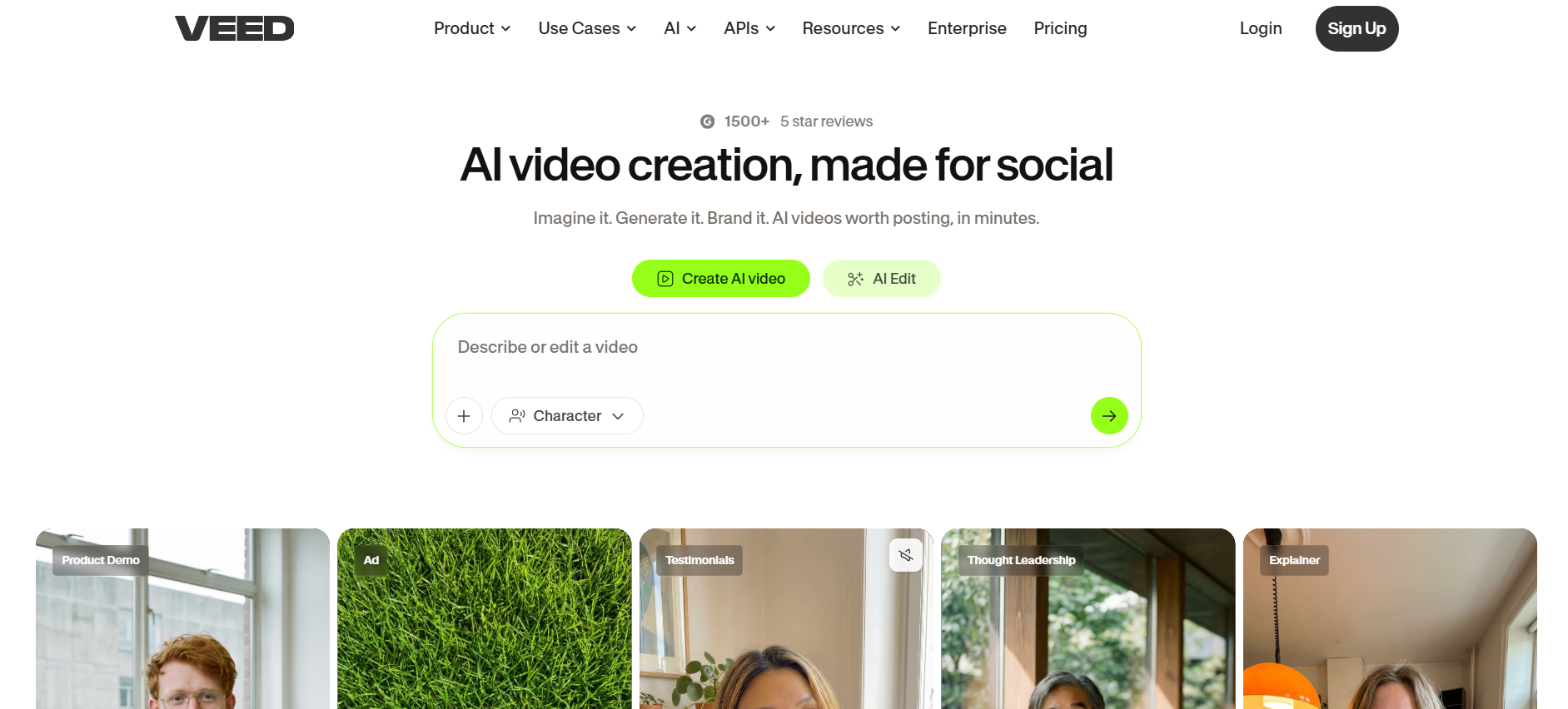
Step 2. Choose a path from the homepage. “Create AI video” opens a prompt box with a Character selector for generating footage from text, while “AI Edit” is where you upload raw footage (MP4, MOV, AVI, and WebM all import) to work with existing clips.
Step 3. Let auto-subtitles run, apply Clean Audio to strip background hiss, and resize the canvas to 9:16 for Reels or 1:1 for feed. The resize reflows captions and on-screen elements to the new frame rather than cropping them off.
Step 4. Export a watermark-free MP4. Rendering happens in Veed’s cloud, so the tab stays free while a long export processes and the machine does not bog down.
Step 5. Download the finished file and publish, or pass it to a scheduling tool.
The reason teams stay on Veed is the single tab: captioning, noise removal, platform resizing, and AI generation sit in one place. The friction that shows up under real load is rendering lag on very large projects, so heavy editors keep source files trimmed before importing.
Pros and Cons
Pros
- Auto-subtitles are unlimited on every paid plan across 125+ languages, with no per-minute charge once on a paid tier.
- The browser-only workflow runs on any device, including Chromebooks and locked work machines, with no software to install.
- More than a dozen named AI video models, including Google Veo 3.1 and Sora 2, are accessible under one Pro subscription.
- Eye Contact AI corrects off-camera gaze automatically, which is uncommon among browser-based editors at this price point.
- Rated 4.6/5 on G2 from 2,141 verified business buyers, 4.8/5 on the App Store from 19,000 ratings, and 4.2/5 on Trustpilot from 3,705 reviews. VEED also holds a G2 Winter 2026 Leader badge in the AI Video Generators category, awarded on customer satisfaction and market presence scores.
Cons
- AI credits reset annually with no rollover, so heavy use of premium generation models can drain a year’s allowance faster than the plan price suggests.
- Per-seat billing multiplies quickly for teams, since every editor needs a paid seat rather than sharing one workspace license.
- Buffering and lag are consistently reported under heavy project loads, with large-file projects slowing on browser rendering.
- Billing transparency, particularly around annual auto-renewals and per-seat escalation, is a recurring complaint in verified user reviews.
- Long-form editors who need offline rendering, multi-track audio mixing, or color grading will not find those capabilities here.
Who It’s For
VEED.io is built for social media managers, content marketers, and solo creators who need captions, platform resizing, and AI video in one browser tab. These are the users who see per-video production time drop the most, because unlimited auto-subtitles, the brand kit, and one-click aspect-ratio changes remove the steps that usually take the longest.
Solo creators publishing two to four social videos a month get everything they need from Creator at $10/month annually, as long as they do not need heavy AI generation. Small marketing teams shipping eight to twelve videos a month are the natural fit for Pro, where the brand kit and 30,000 annual credits start paying for themselves across regular output.
Who should look elsewhere: teams doing long-form post-production, offline editing, multi-track audio mixing, or professional color grading. Podcast-first and localization-at-scale teams also hit Veed’s annual voice and translation allowances faster, and will get more from AI tools built specifically for those jobs.
Is It Worth It?
VEED.io is worth it when a small team needs captions, resizing, brand consistency, and AI video in one subscription. It stops being worth it once a team’s primary need is desktop-grade post-production, or when dubbing and voice generation become the main workload.
When it pays off. A three-person marketing team on Pro pays $63/month and ships eight social videos a month. At that volume, unlimited auto-subtitles, platform resizing, and the brand kit alone replace tools that would cost more bought separately. The 30,000 annual credits and 144 hours of AI voice cover regular output without running out mid-year on standard models.
When it does not. Credits reset every year with no rollover, so heavy use of premium generation models can drain a plan faster than the seat price suggests, pushing a team to Studio. Per-seat billing compounds: a five-person Studio team costs $175/month, and at that spend a podcast-first or offline-editing team will almost always get better value from software built for those specific workflows.
Alternatives
Three tools come up in every VEED.io comparison: Descript, Kapwing, and Canva. None of them is a straight swap.
Descript is the choice if your main output is spoken-word content: podcasts, interviews, course videos, or talking-head recordings. Where Veed organizes work as a timeline you edit visually, Descript turns your video into a text document. Delete a sentence from the transcript and that audio and video segment disappears from the timeline. For anyone who spends most of their editing time cutting words rather than trimming clips, that workflow is dramatically faster than anything Veed offers. The trade-off is scope: Descript does not generate AI video from prompts, its subtitle language support covers 25 languages versus Veed’s 125+, and translation and dubbing only unlock at Business ($50/month annually). Hobbyist starts at $16/month on annual billing.
Kapwing is the choice if team collaboration and silence removal are more important than AI video generation. Its Smart Cut tool automatically strips silences, filler words, and dead air from uploaded recordings, which cuts editing time significantly for talking-head and podcast-to-video workflows. The team pricing model is also more predictable: a five-person workspace on Business pays a flat rate rather than per-seat billing that stacks the way Veed’s does. The limitation is AI credits: Kapwing Pro caps auto-subtitles at 1,000 minutes per month and has no AI video generation comparable to Veed’s model library. Pro starts at $16/month on annual billing, which is $5 less per seat per month than Veed’s Creator plan.
Canva is the choice if your team already lives in Canva for graphics, social assets, and presentations and wants to add basic video without switching tools. The design library, template depth, and brand kit inside Canva are unmatched for teams producing mixed-format content, where one project might mean a carousel, a video, and a presentation built from the same brand assets. What Canva does not offer is meaningful AI video generation from prompts or multi-language dubbing at scale, and the video timeline is shallower than Veed’s for anything beyond simple cuts and text overlays. Pro starts at $10/month on annual billing ($120/year for one user).
Summary table
| Tool | Core Strength | Best Use Case | Starting Price | Key Limitation |
| VEED.io | Unlimited auto-subtitles and 14+ AI video models in one browser tab | Social teams needing captions, brand kits, and AI video generation | $10/mo Creator (annual) | Per-seat billing escalates fast; AI credits do not roll over |
| Descript | Transcript-based editing: cut video by editing text like a document | Podcasts, interviews, and dialogue-heavy long-form content | $16/mo Hobbyist (annual) | 25 subtitle languages vs Veed’s 125+; dubbing only from Business at $50/mo |
| Kapwing | Smart Cut silence removal and flat-rate team collaboration | Small teams managing multi-project social pipelines | $16/mo Pro (annual) | Auto-subtitles capped at 1,000 min/month on Pro; no AI prompt-to-video |
| Canva | Design-first templates inside the full Canva asset library | Teams producing mixed-format content across graphics, video, and slides | $10/mo Pro (annual, $120/yr) | No AI prompt-to-video generation; lighter video timeline depth |
FAQs
Is VEED.io free to use professionally?
No. The Free plan adds a watermark to every export and caps video length and monthly subtitle minutes, making it unsuitable for branded or client-facing content. Creator at $10/month annually is the minimum for professional use.
Does VEED.io work without downloading software?
Yes. VEED.io runs entirely in a web browser with no installation required. It works on Chromebooks, tablets, and employer-managed machines where installations are blocked, which is a direct advantage over desktop tools like Premiere Pro or DaVinci Resolve.
How does VEED.io’s Pro plan compare to Kapwing Pro for a solo creator?
Kapwing Pro costs $16/month on annual billing and VEED Pro costs $21/month, and they serve different needs. Kapwing Pro includes all AI tools with no per-use credit caps and 1,000 subtitle minutes per month. VEED Pro gives unlimited auto-subtitles, 30,000 AI video generation credits per year, and access to more than a dozen AI models including Sora 2 and Veo 3.1. Solo creators who do not need AI video generation will find Kapwing sufficient at a lower cost. Those who do need prompt-to-video get substantially more capability from VEED Pro.
Does VEED.io support video translation and dubbing?
Yes. Pro includes translation across 50+ languages and up to 144 hours of AI voice per year. Studio raises this to 960 hours of AI voice and 12 hours of translation per year. That is a wider language allowance than Descript (25 languages, translation only from Business at $50/month) and deeper than Kapwing Pro (auto-translation capped at 500 minutes per month).
Is VEED.io good for small marketing teams?
Yes, at three to five editors on Pro. Three seats cost $63/month ($756/year) and cover unlimited auto-subtitles, a shared brand kit, platform resizing, and 30,000 AI credits per year. For teams producing eight to twelve social videos a month, that combination typically replaces several separate subscriptions at a lower combined cost.
What do real users say about VEED.io?
Across App Store (4.8/5, 19K ratings), Trustpilot (4.2/5, 3,705 reviews), and G2, users consistently praise subtitle speed and the browser-based workflow. The most repeated complaints are rendering lag on large projects and billing surprises around annual auto-renewals.