
You found a Koorui monitor on Amazon. The specs read like something that should cost twice as much: 165Hz refresh rate, IPS panel, FreeSync support, all under $150. So you did what any sensible person does before clicking “Add to Cart”: you Googled the brand. And now you’re here, reading a Koorui monitor review, wondering if this is too good to be true.
Here’s the short answer: Koorui is a legitimate monitor brand, not a dropshipping scam, and for most budget buyers the monitors deliver genuine value. But there are real trade-offs on spec accuracy, stand quality, and especially post-purchase support that most reviews skim past entirely. This article covers all of it.
What is Koorui, and why is everyone suddenly talking about it?
Koorui is a consumer monitor brand launched in May 2021 under HKC Group, one of China’s top three large-size LCD panel manufacturers. Because HKC produces its own display panels and owns its glass manufacturing, Koorui can undercut brands that source panels externally while maintaining comparable specs. The brand sells in over 100 countries and has the manufacturing scale to back its specs, which becomes clear when you look at the HKC backstory later in this article.
That’s the piece most reviews skip. When you see a Koorui listing on Amazon for $129, the instinct is to assume it’s a no-name import. The HKC parentage changes that calculation meaningfully.
So who are Koorui monitors built for? Primarily younger buyers and first-time upgraders who want high refresh rates and decent panel quality without crossing the $200 line. Whether you should be in that group depends on your specific use case, covered in detail further down.
Which Koorui monitor should you buy?
| Model | Panel | Resolution | Refresh Rate | Best For | Verdict |
| 24E4 | VA | 1080p | 165Hz (DP) / 144Hz (HDMI) | Casual 1080p gaming | Strong value buy |
| 24E6CA | VA | 1080p | 180Hz curved | Immersive budget gaming | Good if you want curved |
| GP01 | IPS | 1440p | 165Hz | Serious gaming + color balance | Best overall pick |
| 34E6UC | VA | 1080p ultrawide | 180Hz | Ultrawide on a budget | Solid at $259.99 |
| 27-inch 4K | IPS | 4K | 60Hz | Productivity / WFH | Fine for documents, not gaming |
For most readers landing on this review, the GP01 is the smartest buy if your budget stretches to 1440p. The 24E4 is the right call if you’re strictly under $150 and primarily gaming at 1080p.
“Okay, but which one do I actually get?” That depends on what the specs claim versus what they deliver. And that’s where things get more complicated.
What Koorui gets right: panel performance and refresh rate reality
The headline performance claims hold up better than skeptics expect. The 180Hz refresh rate on the 24E6CA and 34E6UC has been independently verified as genuine and measurable, not a marketing exaggeration. An experienced display reviewer at VividRepairs, writing after 12 years of hands-on testing, rated the Koorui 24E3 (180Hz curved VA) 7.5 out of 10, noting that the VA contrast ratio outperforms budget IPS rivals and that Adaptive Sync functions correctly with both AMD and Nvidia GPUs.
The VA panel advantage is real and worth understanding. Budget IPS monitors at the same price point typically deliver contrast ratios around 1000:1. Koorui’s VA panels land closer to 3000:1, which translates to noticeably deeper blacks in darker games and movies. If you play anything in dimly lit environments (RPGs, horror titles, cinematic games), that contrast gap is visible.
VESA mount compatibility is confirmed across the main lineup, which matters if you plan to use a monitor arm. The built-in stands are functional but not impressive, and more on that shortly.
TweakTown’s April 2026 review of the 34E6UC gave it 78 out of 100, specifically praising gaming performance relative to its $259.99 price while noting that build quality uses cheaper plastic throughout.
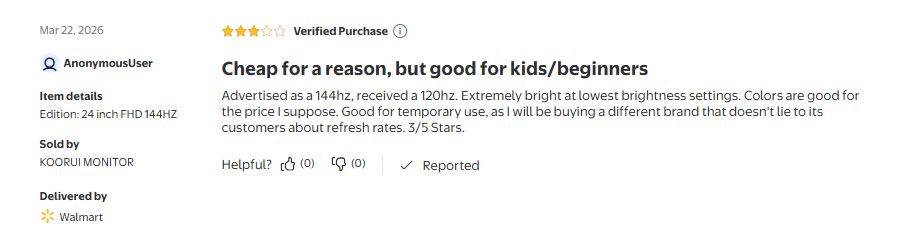
The refresh rate story does require one connector-specific clarification. The 24E4 runs 165Hz via DisplayPort and 144Hz via HDMI. Some Walmart buyers reported receiving units advertised at 144Hz that only displayed at 120Hz. This is most likely an HDMI bandwidth limitation at certain resolutions, not a defective unit. If you’re targeting maximum refresh rate, use DisplayPort.
Where Koorui falls short
Here’s the thing nobody tells you in the promotional writeups: several Koorui marketing claims are technically true but practically misleading.
HDR is the biggest one. Most Koorui monitors advertise HDR10 or HDR400 support. Both are the lowest tier of HDR: no local dimming, limited peak brightness, and no meaningful difference from SDR content in most viewing scenarios. The TechGadgetsCanada 4K review and TweakTown’s 34E6UC review both flag HDR as a checkbox feature rather than a usable upgrade. Treat it as absent. If HDR performance matters to you (for video editing, HDR gaming on PC, or watching Dolby Vision content), Koorui’s budget lineup isn’t built for it.
Response time marketing is similarly stretched. The “1ms” claim on most Koorui gaming monitors refers to MPRT (Moving Picture Response Time), which measures backlight strobing, not actual pixel transition speed. Measured GTG (Grey-to-Grey) response times are higher. This isn’t unique to Koorui; many budget brands use MPRT marketing. But it matters if you’re making a purchase decision based on that number.
Out-of-box settings need adjustment. The consistent complaint in lower-star buyer reviews is ghosting on default overdrive settings. Fixing it requires manually cycling through the OSD overdrive modes, typically one or two steps up from default. It’s a five-minute fix, but the monitor is not plug-and-play optimal out of the box.
The stand is a documented weak point. Across VividRepairs, TweakTown, and TechGadgetsCanada, this pattern appears consistently: the plastic stand feels flimsy, and assembly requires care. One reviewer testing the 27-inch 4K model reported the stand detaching completely during first assembly, sending the monitor to the floor. She filed with Amazon (not Koorui) and received a replacement without issue. If you have a VESA monitor arm, use it and skip the stand entirely.
What real buyers say about Koorui monitors
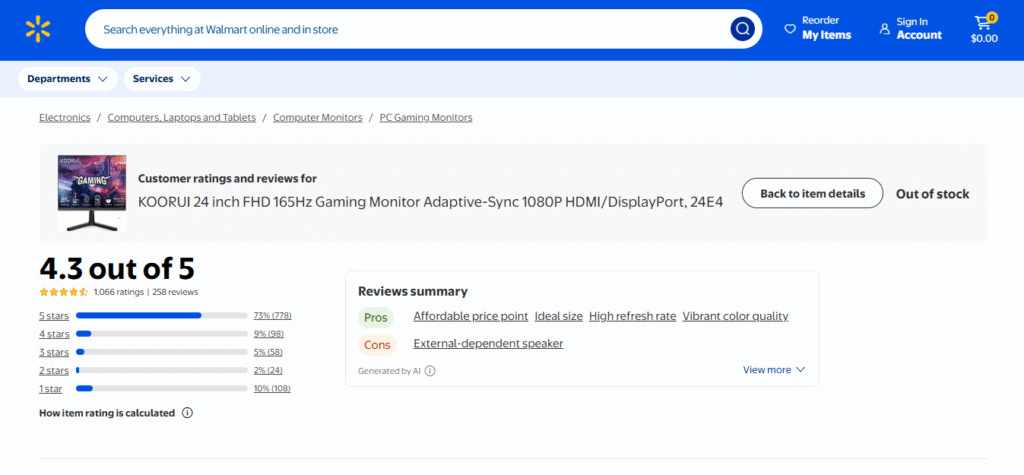
The Koorui 24E4 holds 4.3 out of 5 stars from 1,066 ratings on Walmart as of July 2026, with 73% of buyers rating it five stars. Most people who buy it are satisfied. The lower-star reviews, however, carry specific information worth knowing before you order. Reviews below span November 2025 through March 2026.
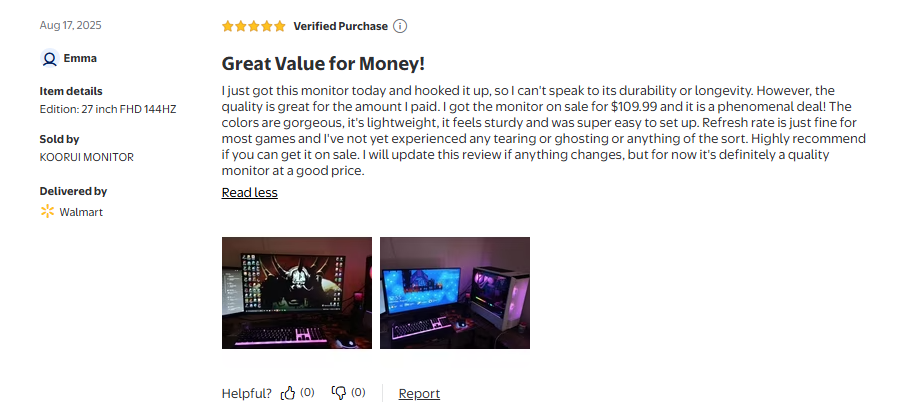
Positive buyers consistently praise the image quality at the price and the visible smoothness compared to their previous 60Hz displays. One verified buyer picked up the 27-inch model for $109.99 on sale and called it a phenomenal deal, noting no tearing or ghosting in regular use.
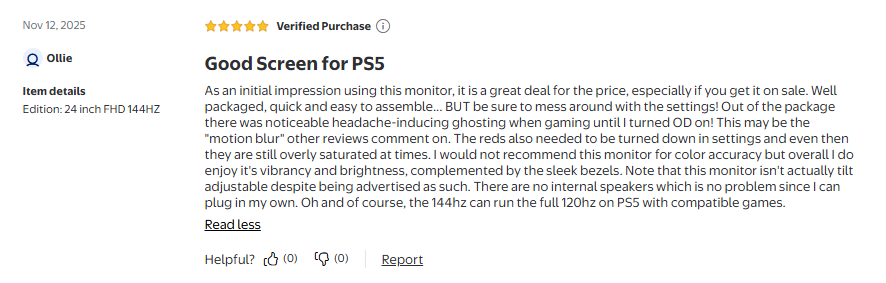
Critical reviews are more specific. A five-star buyer of the 24-inch model flagged noticeable ghosting straight out of the box until overdrive was enabled manually, and confirmed the reds run oversaturated on default settings.
The most important critical review for spec-conscious buyers comes from March 2026: a unit advertised as 144Hz delivered at 120Hz. The buyer’s conclusion was that it is acceptable for beginners but not for buyers who expect advertised specs to match delivered performance.
Is Koorui a legitimate brand? The HKC backstory
Koorui is not a dropshipping brand or a generic import relabeled for Amazon. It is a dedicated consumer-facing brand built by HKC Group (formerly Shenzhen HKC Technology), which the company’s official about page describes as one of China’s top three large-size LCD panel manufacturers with products sold in over 100 countries. HKC produces its own display panels and glass, a supply chain advantage most monitor brands at this price point do not have.
The CES 2025 debut of the world’s first 750Hz consumer monitor, backed by HKC’s proprietary manufacturing, is the clearest public signal that this isn’t a company licensing specs and shipping generic hardware. A 750Hz prototype requires serious engineering investment and manufacturing capability.
Koorui was founded specifically in 2021 to target the global youth and gaming market, which explains both the aggressive pricing and the refresh-rate-forward lineup. The brand is genuinely competing with AOC, MSI, and entry-level LG on specs per dollar, and mostly winning that comparison on paper.
What it doesn’t yet have is the post-purchase track record of those established brands.
Koorui’s warranty and customer service
Koorui advertises a 3-year spare parts warranty and a 12-month replacement warranty on most models. The advertised coverage is reasonable for the price tier. The execution is where things get complicated.
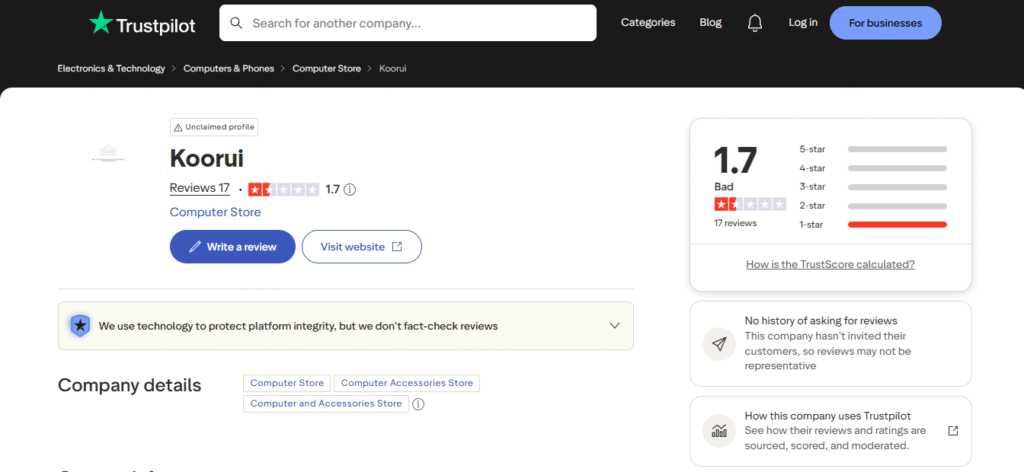
Koorui holds a 1.7 out of 5 rating from 17 reviews on Trustpilot, rated “Bad” by the platform’s own classification. The consistent pattern: buyers who contact Koorui directly via WhatsApp for warranty claims get fast initial replies but no real resolution, with support agents appearing to stall rather than escalate.
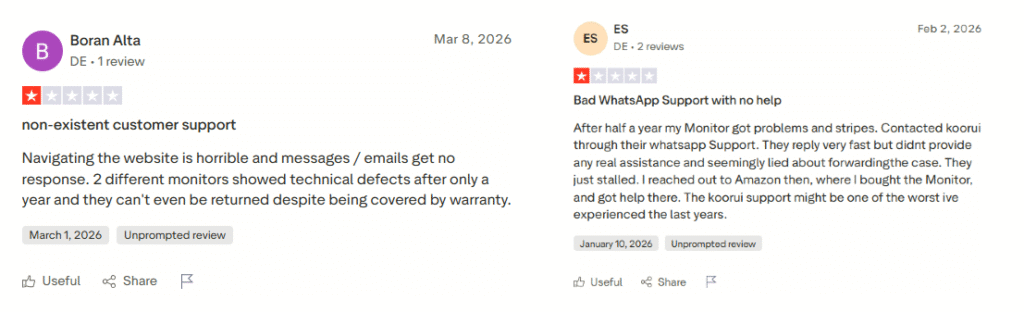
Two verified reviews illustrate the pattern directly. One buyer from Germany reported their monitor developing pixelation and discolouration within a year. Koorui’s WhatsApp support replied quickly but provided no real assistance and appeared to stall the case. The buyer resolved it through Amazon instead. A second buyer from Ireland reported similar malfunction within a year and described Koorui’s customer support as unresponsive entirely.
The sample is small and Koorui has not actively invited reviews on the platform, so it should not be read as the universal experience. But the pattern is specific enough to be worth knowing before you buy.
The practical takeaway is straightforward: buy through Amazon, not direct. Amazon’s 30-day return window and A-to-Z Guarantee give you more reliable recourse than Koorui’s direct support channel. If something fails in the first month (dead pixels, backlight bleed, stand failure), Amazon processes the return or replacement without requiring you to navigate Koorui’s support chain. Check for those issues within the first 30 days and act immediately if you find them.
Who should buy a Koorui monitor (and who shouldn’t)
Buy a Koorui monitor if:
- You’re upgrading from a 60Hz display for the first time and want a genuine performance jump without spending $250+
- You’re a casual to mid-tier 1080p gamer playing FPS, RPGs, or multiplayer titles at standard competitive settings
- You need a secondary or dual-screen monitor where image accuracy isn’t the priority
- You’re a college student or early career buyer on a strict budget who understands the trade-offs going in
- You use a monitor arm (VESA-compatible across the lineup, which sidesteps the stand quality issue entirely)
Skip Koorui and spend more if:
- You work in photography, video editing, print design, or any field where color accuracy affects deliverables. Buyers on Walmart explicitly flag the 24E4 and 24E6CA as unsuitable for color-critical work, even as a secondary display.
- You’re a competitive FPS player who needs 240Hz+ at 1440p. The GP01 tops out at 165Hz at 1440p, and purpose-built options exist at similar prices.
- You expect responsive, reliable brand-direct support if something goes wrong post-warranty.
- You want HDR as a genuine feature. At this tier, it isn’t.
Koorui monitor alternatives worth considering
If Koorui isn’t the right fit, these three alternatives compete in the same price band:
| Alternative | Why consider it | Trade-off vs. Koorui |
| AOC C24G1 | Higher VA contrast, more established brand support | Slightly older model; refresh rate ceiling lower |
| LG 27GN800-B | Better IPS color accuracy, strong brand track record | Costs more; LG’s budget IPS doesn’t match VA contrast |
| MSI G241 | Similar price, more established after-sales support | Narrower refresh rate range; less lineup variety |
For budget buyers where the Koorui price point is the deciding factor, none of these fully undercut Koorui on specs per dollar. The AOC C24G1 is the closest direct swap if you want stronger brand confidence without stepping significantly up in price.
The bottom line
This Koorui monitor review has covered a lot of ground, and the bottom line is straightforward: Koorui is a real company with a real manufacturing advantage, making monitors that punch above their price point on refresh rate and VA contrast. For first-time upgraders, casual gamers, and students who need a functional high-refresh display under $200, the value case is legitimate. The 24E4 for 1080p gaming and the GP01 for 1440p are both solid picks at their respective price points.
The catches are real: verify your unit in the first 30 days, ignore the HDR marketing, and either use a monitor arm or assemble the stand very carefully. If you go in with those expectations calibrated, a Koorui monitor is unlikely to disappoint. For deeper model research, RTINGS.com has reviewed at least one Koorui model (the S2741LM) with full lab-measured data and is worth checking before you finalize your decision.
If you’re still comparing options in the budget monitor space, our guide to the best monitors under $200 covers how Koorui stacks up against the full field.
Frequently asked questions
Is Koorui a good monitor brand?
Koorui is a legitimate brand owned by HKC, one of China’s top three LCD panel manufacturers, and its monitors offer genuine value for budget buyers under $200, particularly on refresh rate and VA contrast. Customer service responsiveness via direct channels has been inconsistent based on Trustpilot reviews through July 2026, so buying through Amazon for buyer protection is strongly recommended.
Who makes Koorui monitors?
Koorui is a consumer brand launched in May 2021 under HKC Group, a Chinese display manufacturer ranked among the top three globally for large-size LCD panel production. HKC manufactures its own panels and glass, giving Koorui a supply chain cost advantage over brands that source panels externally.
Is the Koorui 24E4 good for gaming?
The 24E4 is a strong value option for casual and mid-tier 1080p gaming, delivering 165Hz via DisplayPort and FreeSync/G-Sync Compatible support. The VA panel provides good contrast for darker scenes, but overdrive settings need manual adjustment out of box to reduce ghosting, and the 1ms specification refers to MPRT backlight strobing rather than actual measured pixel transition times.
Does Koorui HDR actually work?
Most Koorui monitors support HDR10 or HDR400, the lowest tier of HDR, which lacks local dimming and offers limited peak brightness improvement over SDR. At this tier, HDR is effectively a checkbox feature. Multiple independent reviews, including TweakTown’s April 2026 evaluation of the 34E6UC, confirm it provides no meaningful real-world upgrade for gaming or video content.
Is Koorui better than AOC or LG at the same price?
Koorui often matches or undercuts AOC and LG on specs per dollar, particularly on refresh rates and panel size. Established brands like LG and AOC carry more consistent customer service reputations and wider retail support. For pure spec value at under $200, Koorui competes strongly. For long-term reliability confidence and post-purchase support, LG and AOC have the documented track record.
Does Koorui have a good warranty?
Koorui advertises a 3-year spare parts and 12-month replacement warranty on most models, which is reasonable for the price tier. Trustpilot reviews through July 2026 document inconsistent responses from direct Koorui support channels. The most reliable warranty path is purchasing through Amazon and using Amazon’s buyer protection rather than contacting Koorui directly.
What is the best Koorui monitor to buy in 2026?
For most buyers, the Koorui GP01 (24-inch, 1440p, 165Hz IPS) offers the best balance of resolution, color accuracy, and gaming performance. Budget 1080p buyers are well served by the 24E4 at 165Hz or the curved 24E6CA at 180Hz. The 34E6UC at around $259.99 is a competitive ultrawide option (verify current pricing before purchase). Avoid the basic 60Hz to 75Hz office-tier models unless the use case is exclusively document work.