

Here is how real estate agents use AI in 2026: eight out of ten now use it in some form, according to a February 2026 survey by Realtors Property Resource (RPR), the data platform owned by the National Association of REALTORS. If you had shown that number to anyone in 2022, they would have guessed it was a prediction for 2030.
Here is the number nobody leads with. Only 17% of those agents say AI has made a real difference to their business, based on NAR data reported by HousingWire. Nearly half say they see no difference at all. So most agents are using AI, and very few are winning with it, which means the best AI tools for real estate agents are not actually the problem.
That gap is a workflow problem. Agents download ChatGPT, ask it something vague, get a vague answer back, and decide AI does not work for real estate. This article fixes that: what to use, the exact wording that works, and the mistakes that quietly waste agents’ time and money.
What separates agents saving hours a week from everyone else
The RPR survey found that 34% of agents save four or more hours a week using AI. I cross-checked that against the Zillow 2026 Agent Trends Survey, which found nearly half of agents now use AI tools daily and that ease of use, not price, is what makes agents stick with a tool.
This is really the story of how real estate agents use AI differently once it works for them. The pattern is not which tools these agents use. It is how they use them.
Agents who save time do three things consistently. They apply AI to the same handful of tasks every week instead of a different task each time. They keep a saved prompt for each task instead of typing from scratch. And they add their own local knowledge into every prompt: the neighborhood, the buyer type, the specific detail a generic AI model has no way of knowing.
What “best AI tool” actually means here: it is not the platform with the most features. It is whichever tool removes a task that was eating real time and turns it into a five-minute review step. Keep that in mind as you read through the list below.
Before you subscribe to anything, answer these four questions
- What single task is costing you the most time right now? Not a category. A specific task: writing listing descriptions, responding to after-hours leads, prepping for a seller consultation.
- Do you need this free, or can you commit $20 to $60 a month if it works? Free tiers almost always cap out around day 30. Know your answer before that happens.
- Are you trying to do a task faster, or remove it completely? Writing tools make a task faster. Voice AI can remove after-hours phone follow-up entirely. Different tools, different jobs.
- Does it need to connect to your CRM, or can it stand alone? Standalone tools like ChatGPT and Canva are easier to start with. CRM-embedded AI takes setup time but pays off more over months.
Pick the tool that answers question one first. Everything else can wait. That is really how you find the best AI tools for real estate agents in your specific situation, not by reading a ranked list, but by matching a tool to the task actually costing you time.
Writing listing descriptions, emails, and CMAs
Tools: ChatGPT, Saleswise
Writing is the most common AI use case among agents, per the RPR survey. It is also where the gap between useful output and “this sounds fake” complaints is widest. The difference is almost always the prompt.
A listing description prompt that does not sound generic
Copy this structure and fill in the brackets for each new listing:
Role: You are a real estate copywriter who knows [neighborhood name] well. Property: [Address], [beds/baths], [square footage], [year built]. Standout features: [3 to 5 specific details, not “updated kitchen” but “quartz counters, 42-inch shaker cabinets, Bertazzoni range”]. Target buyer: [first-time buyer / downsizer / investor / growing family]. Tone: [warm / modern / community-focused]. Word count: 150 to 175 words for MLS. Do not open with “Welcome to.” Local detail to include: [one specific fact: walkability, school district, a nearby landmark].
Running a plain prompt like “write a listing description for a 3 bed 2 bath home in Austin” through ChatGPT confirms this. The result opens with “Welcome to this beautifully maintained 3-bedroom, 2-bathroom home in the heart of Austin,” and goes on to describe a “well-appointed kitchen,” a “relaxing” primary suite, and a backyard “ready to fit your lifestyle.” Nothing in it is wrong, but nothing in it is specific either. No real address, no actual finishes, no neighborhood detail, nothing that would tell you this listing apart from a hundred others in the same price range. The structured version above forces in the details a plain prompt leaves out, so what comes back usually needs light editing instead of a full rewrite.
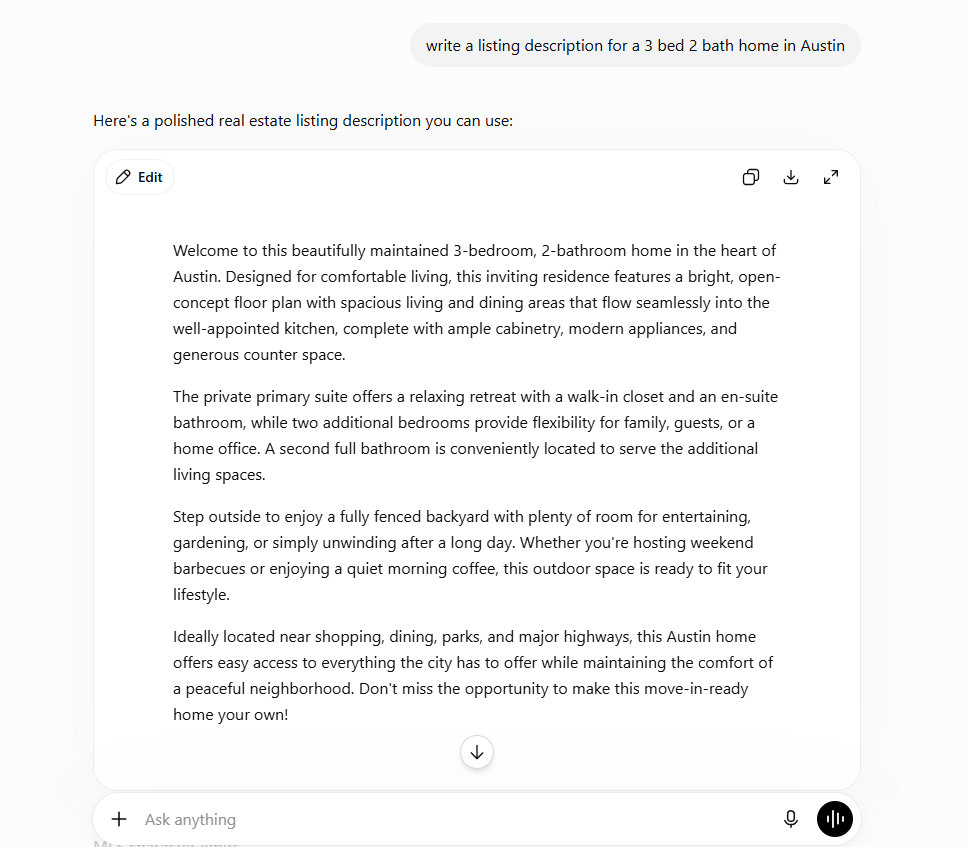
The mistake that makes AI copy sound generic: skipping local detail. ChatGPT does not know your market. You do. Put that in the prompt every time.
For CMAs: Saleswise pulls from live MLS data and builds a client-ready narrative around it. A generic AI tool gives you a narrative you still have to fact-check. Saleswise starts from actual comps. The practical time saved is around 20 minutes per CMA.
Pricing: ChatGPT free plan is available; Plus is $20/month. Saleswise runs $39/month for unlimited access to its full suite (CMAs, listing descriptions, emails, scripts, and virtual staging), with a 7-day trial available for $1. Confirm the current price on their site before subscribing, since tiers can shift.
Fair housing reminder: read every AI-written description before publishing. Phrases like “perfect for a young family” or “great for professionals” can raise fair housing concerns. AI models do not screen for this on their own.
The speed-to-lead problem, and the tools built to fix it
Tools: Follow Up Boss AI, Lofty AI Assistant, Structurely
A 2014 study by WAV Group, a real estate industry consulting firm, tracked 384 brokers and found the average lead response time was 917 minutes, over 15 hours. The study is over a decade old, but industry sources still cite it because more recent, smaller samples keep showing the same pattern: agents are slow to respond, and slow responses cost deals.
A separate, older but frequently cited study from MIT researcher Dr. James Oldroyd with InsideSales.com found that leads contacted within five minutes are roughly 21 times more likely to qualify than leads contacted after 30 minutes.
What does speed to lead actually mean for conversion?
Speed to lead is the time between a lead submitting an inquiry and an agent making first contact. The research above points to five minutes as the window that matters most. Past 30 minutes, qualification rates drop sharply no matter how good the follow-up message is. AI follow-up tools solve this by sending a personalized first response the moment a lead comes in, including at 2 a.m.
Follow Up Boss with AI drafts and can send an initial response the moment a new lead enters your CRM, based on where the lead came from and what they asked about. You can review before sending or set parameters for automatic replies. AI features (smart summaries, smart messages, suggested tasks, predictive lead prioritization) are available on the Pro plan and above. Pricing as of July 2026: Grow is $69/user/month, Pro is $499/month for 10 users, and Platform is $1,000/month for 30 users (each with a lower annual rate). Additional users on Pro run $49/month; on Platform, $20/month.
Lofty AI Assistant works similarly inside Lofty and adds multi-touch follow-up: if a lead does not respond to the first text, it follows up again at a set interval automatically.
Structurely handles the early qualification conversation by text and email (timeline, financing, area of interest) and hands you a summary once a lead is qualified. Structurely does not publish pricing, and reported figures from industry sources vary widely, anywhere from roughly $150/month to $500/month depending on lead volume and contract terms. Request a live quote before budgeting. It is built for agents with meaningful lead volume; if you are getting fewer than 50 leads a month, this one is premature.
Set this up before you need it. Configure your AI response template today, not the night a lead comes in at 11 p.m.
Virtual staging that passes MLS review
Tools: REimagineHome, Collov AI
Both tools turn an empty room photo into a furnished one in under three minutes.
| REimagineHome | Collov AI | |
| Starting price | $19/month (Essential, 30 credits) | $19/month (Standard, billed yearly) or $27/month billed monthly |
| Most popular tier | Pro at $36/month, 200 credits | Advanced at $49/month (yearly) or $59/month (monthly), 150 credits |
| Top tier | Agency at $119/month, 900 credits | Enterprise at $127 to $170/month, 526 credits |
| Free option | 5 free designs for new users, one-time | No free tier |
| Best for | Budget-conscious agents, credit-based flexibility | Luxury and architectural listings, more editing depth |
Both platforms price by credits rather than a flat unlimited plan, so your actual monthly cost depends on how many rooms and photos you run through them. Check the credit allowance on each tier against your typical listing volume before committing.
The compliance issue most agents overlook: in November 2025, the New York Department of State issued a formal warning about AI-generated listing images that misrepresent a property. The issue was not that virtual staging exists. It was agents publishing AI-staged photos with no disclosure, so buyers showed up expecting furniture and finishes that were not real.
Label every AI-staged photo “virtually staged” in the MLS caption and in your marketing. This is a New York-specific notice, but accurate representation in listing photos applies everywhere.
When staging backfires: on occupied homes. AI staging tools do not reliably work around existing furniture, and the results often look inconsistent. Use these tools on empty rooms. That is where they perform well.
Finding seller leads before your competition does
Tools: Top Producer Smart Targeting, Smartzip
These tools use public records, equity data, and behavioral signals to flag homeowners likely to sell in the next 6 to 12 months. Smartzip reports 72% accuracy on these predictions. That figure comes from Smartzip itself and has not been independently verified, so treat it as directional.
Here’s the part most vendor pages leave out: predictive farming only works if you commit to one defined area. Agents who split their budget across three zip codes get thin, unconvincing coverage everywhere. Agents who focus on 400 to 600 homes in a single farm and stay consistent for 12 to 18 months are the ones who see it pay off.
Who this is not for: new agents who need buyer leads in the next 90 days. This is a long game. If you are under two years in the business, build your lead response workflow first and come back to predictive farming later.
Pricing: Top Producer actually does publish its pricing. The base Pro CRM is $179/user/month. The predictive farming feature (Smart Targeting) sits inside Pro + Farming, which starts from $599/month, with the final cost scaling to your farm size. Team plans range from $399/month for up to 5 users to $1,199/month for up to 25 users. Smartzip does not publish pricing. Reported figures put it starting around $500/month, with many agents landing closer to $1,000/month once direct mail and follow-up tools are added on top. Request a quote before budgeting for either.
One more thing, if you’re an investor rather than an agent: the workflow above is built for licensed agents working with buyers and sellers. Investors chasing off-market deals need different tools. PropStream is the standard for building motivated-seller lists ($99/month base, though most investors land around $150 to $300/month with add-ons). For deal analysis, ChatGPT or Claude can build a cash flow breakdown from numbers you paste in, though neither pulls live comps the way PropStream does. Treat any AI valuation as a starting filter, not a final number. Error rates on automated models can run several points off in either direction.
Social media content and listing videos in under 30 minutes a week
Tools: Canva AI (Magic Studio), Trolto
This is the gap in almost every other article on this topic. Social content eats real time every week, and it is also one of the safest places to use AI because you can review the output before anything goes live.
The batch workflow: once a week, run this prompt in ChatGPT:
You are a real estate content strategist for an agent in [city/region]. Write 20 social captions for Instagram and Facebook: 5 local market stat posts, 5 home buying tip posts, 5 posts about a recent listing (use placeholder details), 5 personal-brand posts (local spot, community event, behind the scenes). Keep each under 150 words. Avoid phrases like “dream home” or “keys to your future.” Write like a person talking, not a brochure.
That produces a month of caption drafts in about five minutes. You swap in real listing details, adjust local references, and schedule. Most agents report spending 20 to 25 minutes total instead of hours staring at a blank caption box.
Trolto (at trolto.com, not to be confused with similarly named sites) has grown beyond a simple photo-to-video converter into a fuller marketing platform: cinematic listing videos, a listing website, weekly branded social posts, and local blog content, all generated from your listing photos.
Pricing: Starter is $59/month (one listing website, weekly social posts, listing videos), Pro is $99/month (higher volume across all of the above), and Enterprise is custom for teams. There is no free tier, but a 7-day free trial is available. For agents who only want the video piece without the website and blog features, it is worth checking whether a narrower tool fits better, since Trolto’s pricing reflects the full platform.
How do I create real estate social content with AI?
Use ChatGPT for captions in one weekly batch session. Use Canva’s free Magic Studio for graphics and templates. Use Trolto for listing walkthrough video. Generate captions, drop them into Canva templates with your photos, build the video in Trolto, and schedule the week. Total time: under 30 minutes.
Meeting notes and transaction admin
Tools: Fathom, ListedKit AI
Every buyer consult and listing appointment produces information that needs to land in your CRM. Writing it up immediately breaks your momentum. Waiting an hour loses the detail.
Fathom is a free AI meeting recorder that joins your Zoom or Google Meet calls and transcribes them. Recording, transcription, and storage are unlimited on the free plan, but AI summaries and action items are capped at 5 meetings a month. Past that, Premium runs about $19/month for unlimited AI summaries.
Invite Fathom to every buyer consult. After the call, copy the summary straight into the client’s CRM record. What used to take 10 to 15 minutes of admin now takes under two, at least for your first 5 consults each month on the free plan. If you run more calls than that, the $19/month Premium tier removes the cap.
Check your state’s call recording consent rules first. Some states require you to tell the client the call is being recorded, before it starts.
ListedKit AI tracks transaction deadlines and flags missing documents across active files. Useful once you are juggling six or more transactions at a time. Pricing is credit-based: $14.99 per credit, and each credit covers one transaction stage (one for creating a listing, one for creating a sale once it goes under contract). Credits do not expire, and buying in bulk saves up to 27%. An e-signature add-on (Ava Sign) runs $29.99 per user, free for the first 30 days.
Five mistakes agents make with AI
The RPR survey found 63% of agents worry about AI output accuracy and 49% worry about compliance risk. Almost all of that traces back to one of these five habits.
- Generic prompts with no local context. “Write a listing description” could describe any home anywhere. Add the neighborhood, the buyer type, one local detail. The output quality changes noticeably.
- Publishing AI content with no compliance check. AI tools do not screen for fair housing language or MLS rules. A human reads every piece before it goes out.
- Subscribing to too many tools at once. Zillow’s survey found the typical agent runs two to four tools a week. The agents saving the most time are not running the most tools. They picked one and stuck with it for 60 days before adding another.
- Trusting AI for pricing without checking live MLS data. General AI models are not connected to real-time listings. Any price figure needs a manual cross-check before it reaches a client.
- Posting AI-staged photos with no disclosure. Covered above. Label them every time.
What you can build for $0 a month
ChatGPT free handles listing descriptions, emails, and social captions. The free tier does not save custom instructions the way Plus does, so paste your template prompt at the start of each session for now.
Fathom free gives unlimited recording and transcription, with AI summaries capped at 5 meetings a month. For most solo agents doing a handful of buyer consults a month, that cap does not bind.
REimagineHome gives new users 5 free staging designs to start. After that, the paid tiers begin at $19/month for 30 credits, which is enough for a small number of active listings.
Canva free includes Magic Studio’s core AI design features for graphics and social templates.
Put those together and you have covered listing copy, meeting notes, and a month of social content at no monthly cost, plus enough one-time free credits to stage your first listing on REimagineHome before you need to decide whether the paid tier is worth it.
The bottom line
That is really the answer to how real estate agents use AI well in 2026: not by running more tools than everyone else, but by building one repeatable habit per problem: a saved prompt for listings, an AI response template for after-hours leads, one weekly batch session for social content. Then they ran it long enough to actually measure the result.
If you are not sure where to start, start with your listing descriptions. Use the prompt template above on your next three listings. If it saves you real time and the copy needs only light edits, you have your answer, and the next tool decision gets easier from there.
For a broader look at AI tools by category, see TheDiscoverAI’s tools directory.
Frequently asked questions
What are the best AI tools for real estate agents in 2026?
There is no single best tool. It depends on where your time is going. For writing: ChatGPT with a structured prompt. For lead response: Follow Up Boss AI or Lofty. For virtual staging: REimagineHome. For meeting notes: Fathom. Start with the task costing you the most time.
Are there free AI tools for real estate agents?
Yes. ChatGPT’s free plan covers writing tasks. Fathom’s free plan gives unlimited recording with AI summaries capped at 5 meetings a month. REimagineHome gives new users 5 free staging designs to start. Canva’s free plan includes AI design tools. Together, these cover most of a solo agent’s workflow at no ongoing cost.
How are real estate agents using AI in 2026?
Per the RPR survey, the most common uses are writing listing descriptions, drafting follow-up emails, generating social content, summarizing market reports, and setting up automated after-hours lead responses.
Is AI-generated listing content safe to use?
Only with a human review step. AI tools do not screen for fair housing language or MLS compliance on their own. For photos, New York’s Department of State issued a formal warning in November 2025 about undisclosed AI-generated images. Label all AI-staged photos as “virtually staged.”
How much do AI tools for real estate agents cost per month?
A free stack (ChatGPT, Fathom, REimagineHome trial credits, Canva) costs $0 to start. A paid writing and CMA stack (ChatGPT Plus plus Saleswise) runs roughly $59/month based on July 2026 pricing. Follow Up Boss with AI features starts at $499/month for 10 users. Top Producer’s predictive farming tier starts from $599/month, scaling with farm size. Lofty and Smartzip do not publish pricing; reported figures put Lofty around $449 to $500+/month and Smartzip around $500 to $1,000+/month. Confirm directly before budgeting for either.
What AI tools help agents get more listings?
Top Producer Smart Targeting and Smartzip use predictive analytics to flag likely sellers in a farm area. Smartzip claims 72% accuracy, a vendor figure that is not independently verified. These work best for agents with a defined farm area and a 12 to 18 month commitment. Newer agents should build lead response first.
How do I use ChatGPT for real estate listing descriptions?
Give it a structured prompt: your role, the property specs, 3 to 5 specific features, the target buyer, your tone, and a word count of 150 to 175 words. Always check the output against the real property before publishing, and save your best prompt as a template to reuse.