
If you work anywhere near money and code, you’ve probably noticed something strange. Half your feed shows fintech companies bragging about shipping faster with AI. The other half shows security researchers warning that AI-written code is full of hidden bugs. Both things are true. Figuring out where you fit between them is the real problem.
Here’s the short answer: in 2026, finance people use two kinds of AI tools. For actual coding, the main options are Claude Code, Cursor, GitHub Copilot, and Windsurf (now rebranded as Devin Desktop). For everyday finance work like Excel and Power BI, Microsoft’s own Copilot is now built specifically for finance tasks. Here’s what each one actually costs, where each one fits, and how to think about the choice.
AI coding tools for finance work, at a glance
| Tool | Price (individual) | Best for | Context window / model access |
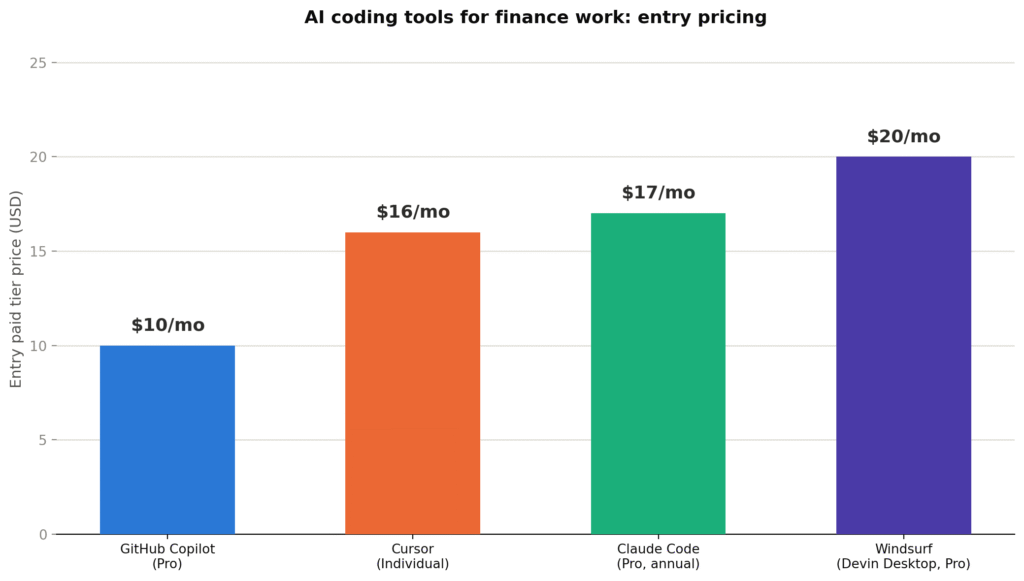
| Claude Code | Free, Pro $17/mo (annual)/$20/mo (monthly), Max from $100/mo | Complex, multi-file projects and big refactors | 1M tokens with Opus 4.8, Claude models only |
| Cursor | $20/month Individual plan ($16/month billed annually) | Daily hands-on editing inside an editor | Auto mode picks the model, includes Claude, GPT, Gemini |
| GitHub Copilot | Free, Pro $10/mo, Pro+ $39/mo, Max $100/mo | Cheapest way in, good for routine completions and chat | Unlimited completions, usage-based credits since June 2026 |
| Windsurf (now Devin Desktop) | Free (limited), Pro $20/month, Max $200/month | Full IDE experience, alternative to Cursor | Claude, GPT, and Gemini, plus Devin Cloud agent access on Pro |
Claude Code
Claude Code is a coding assistant from Anthropic that runs in the terminal, not a normal editor window. It comes bundled with the $20/month Claude Pro plan (about $17/month if you pay yearly), the same plan that includes the regular Claude chat app. Heavy users can move up to Max at $100 or $200 a month for more usage room.
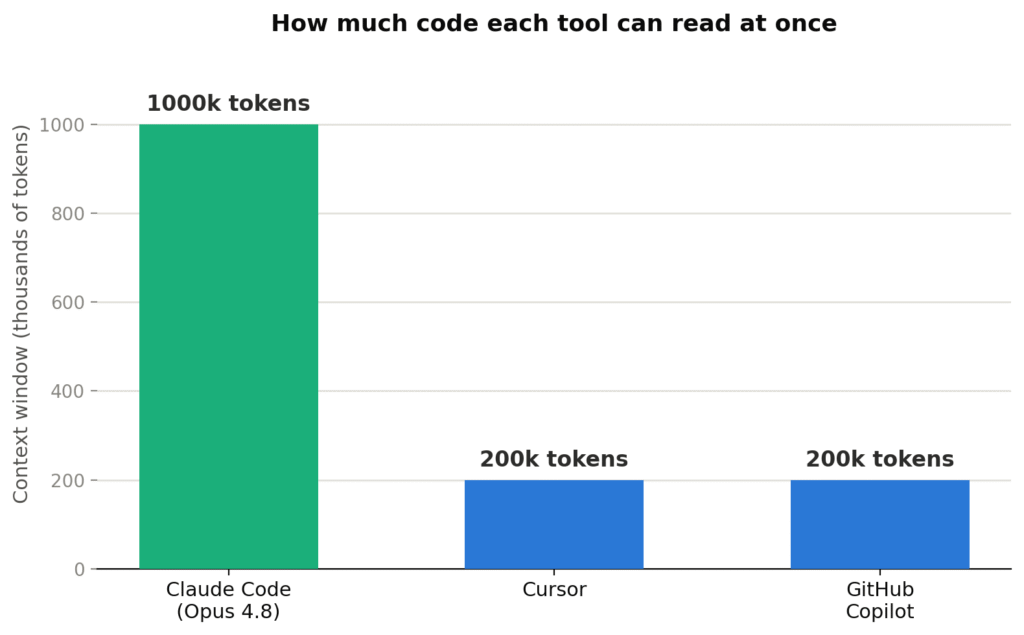
Where it wins: the amount it can read at once. Claude Code can hold a full 1 million tokens of context using Opus 4.8. In plain terms, that means it can read your whole payment system, your tests, and your compliance notes in one sitting and think across all of it together. If your codebase has something like a KYC process spread across a dozen files, this matters more than it sounds like it should.
Where it loses: it lives in the terminal. If you’re a finance person who picked up just enough Python to build a personal script, a command-line tool is a much bigger jump than a normal point-and-click editor. It also only works with Claude models. If Claude has a rough day, you don’t have a backup model to switch to.
I tried it myself. I asked Claude Code to clean up a multi-file interest calculation that had inconsistent decimal handling across files. It caught the float-versus-decimal problem on its own, without me pointing it out. That’s exactly the kind of money-specific catch a generic tool usually misses.
Who it’s actually for: a real developer, not a hobbyist, working on something complex enough that having the whole system in view is worth learning the terminal.
“Is this actually worth switching to, or is it just a fancier version of what I already use?” It comes down to whether your codebase is small enough to hold in your head already. If it isn’t, this tool was built for exactly that problem.
Cursor
Cursor is a full code editor built on top of VS Code, with AI wired into everything instead of bolted on. The Individual plan costs $20/month, or $16/month if billed annually, and includes unlimited autocomplete plus a $20 credit pool for using stronger models.
Where it wins: everyday hands-on editing. Cursor’s autocomplete doesn’t just guess your next few keystrokes, it guesses your next few edits, and it feels noticeably faster once you’ve used it for an hour. If most of your work is smaller changes to existing files rather than big architecture decisions, this fits more naturally than a terminal tool.
Where it loses: how much it can hold in view at once. Cursor works with several models (Claude, GPT, Gemini) and can auto-pick one for you, but none of them match Claude Code’s million-token memory inside Cursor itself. For large, spread-out financial logic, you’ll hit that limit sooner.
On Reddit, developers who use more than just the big three tools often mention pairing Cursor with something like Aider or Cline instead of picking just one. That fits with what Cursor does well: it’s the better editor, not necessarily the deeper thinker for complicated, multi-part logic.
Who it’s actually for: someone editing an existing financial codebase day to day, not building one from the ground up, who wants AI built into their normal workflow instead of running separately in a terminal.
GitHub Copilot
Copilot is the cheapest real starting point on this list. Pro costs $10/month with unlimited code completions and about $15 a month in credits for chat and agent features. On June 1, 2026, Copilot switched from flat monthly limits to a usage-based credit system, but the basic completions you use constantly stay unlimited and don’t use up any credits.
Where it wins: it fits into whatever editor you’re already using, and at $10/month it costs half of Cursor Pro, Claude Pro, or Windsurf Pro. Business plans also come with legal protection (IP indemnity), which matters if a compliance or legal team has any say in your decision.
Where it loses: there’s a ceiling. Copilot is strong at boilerplate code, completions, and simple chat questions. It’s not built for holding a million tokens in view or running a multi-hour agent session on a messy refactor. For complex financial architecture, it’s a solid helper, not the deepest thinker here.
Most professional developers say the $10 a month easily pays for itself in time saved on boilerplate and debugging within a single day of work, while students and hobbyists tend to stick with the free tier. That split is a fair way to think about whether you’re ready to pay yet.
Who it’s actually for: a finance professional or solo developer who wants the cheapest way to try AI coding before spending real money, or anyone whose work is mostly routine rather than complex.
I checked GitHub’s own pricing page to confirm: Pro is still $10/month, completions stay unlimited and untouched by the credit system, and credits only get used once you lean on chat or agent mode a lot. If most of your work is autocomplete, which covers a lot of routine finance scripting, you might never touch the credit system at all.
“But what if your budget is genuinely tight?” This is where you start. Free tier first, upgrade to Pro only once it earns its $10.
Windsurf (now Devin Desktop)
Windsurf was rebranded to Devin Desktop on June 2, 2026, after its owner, Cognition (the company behind the autonomous coding agent Devin), folded it into the Devin product family. The editor, plans, and pricing all carried over unchanged, only the name and branding changed. If you search for “Windsurf” today, you’ll likely land on a page branded Devin Desktop, that’s expected, not a wrong turn.
Where it wins: unlimited Tab autocomplete and inline edits are available even on the free tier, more generous than most competitors offer at no cost. Pro ($20/month) also gives access to Devin Cloud, Cognition’s autonomous agent that can work in the background while you edit elsewhere, alongside model choice across Claude, GPT, and Gemini.
Where it loses: since its March 2026 pricing change and the June 2026 rebrand, it now costs the same as Cursor Pro, which erases what used to be its clearest price advantage. It’s also mid-rebrand, so documentation and search results for “Windsurf” and “Devin Desktop” are currently mixed, worth confirming you’re looking at current information either way.
Who it’s actually for: someone who wants an alternative to Cursor with a different model lineup and a genuinely useful free tier, particularly if background autonomous agent work (Devin Cloud) is appealing alongside normal editing.
What about Excel, Power BI, and everyday finance tools?
Not everyone reading this needs a coding assistant. A lot of finance work happens entirely inside Excel and Power BI, and Microsoft has been building AI specifically for that world.
Microsoft added finance-specific skills to Copilot in Excel in June 2026, including live finance data connectors and change tracking so you can see exactly what the AI edited in a workbook. Until this update, Copilot in Excel was mostly a general-purpose formula and chart assistant. Now it’s built with finance teams specifically in mind, with the kind of audit trail a finance department actually needs before trusting AI-edited numbers.
Power BI is heading the same direction. Microsoft is retiring its older Q&A feature by December 2026 and replacing it with Copilot as the main way people ask questions of their dashboards. In practice, someone can ask a Power BI report a plain-language question, like why a region missed a sales target, and get a chart with an explanation instead of building that view manually.
There’s a real trust gap worth knowing about. Research cited in a 2025 Gartner report found that while a large majority of finance teams wanted AI-driven insights, less than a third felt confident relying on those insights without checking them manually. That’s exactly why the change-tracking and audit-trail features matter. Finance teams are willing to use AI, they just want to see what it changed and why.
If your work is mostly spreadsheets and dashboards rather than actual code, Copilot inside Excel and Power BI is likely a better starting point than any of the coding tools above. It doesn’t require learning to code at all.
Is this actually a trend, or is it still early and experimental?
It’s a real, established trend, not a handful of teams experimenting. A few concrete signs of that:
- Software engineering is one of the most mature AI use cases in financial services worldwide. The 2026 Global AI in Financial Services Report, published by the Cambridge Centre for Alternative Finance with the Bank for International Settlements, IMF, and World Economic Forum, found software engineering at pilot stage or beyond among 75% of surveyed financial institutions, with 42% of respondents reporting full deployment specifically for that use case.
- Agentic AI, the category that includes autonomous coding agents like Claude Code and Devin, has moved well past early experimentation. The same report found 52% of financial industry respondents piloting or at more advanced stages of agentic AI deployment.
- Citi armed 30,000 developers with generative AI coding tools, CEO Jane Fraser said on the bank’s Q4 2024 earnings call, as reported by CIO Dive in January 2025.
- Microsoft built finance-specific Copilot skills for Excel and Power BI in June 2026 because finance and accounting professionals worldwide rely on those two tools daily.
- Python, SQL, and Java remain among the most in-demand languages for finance and fintech hiring in 2026, and every major AI coding tool on this list supports all three without extra setup.
This is already standard practice at major financial institutions, and a fast-growing habit among smaller teams and individual analysts, not something specific to any one country.
Start here this week if you’re on a budget
Here’s something most guides won’t say plainly: you don’t need the “best” tool. You need the cheapest tool that answers your actual question, and you upgrade once it proves itself.
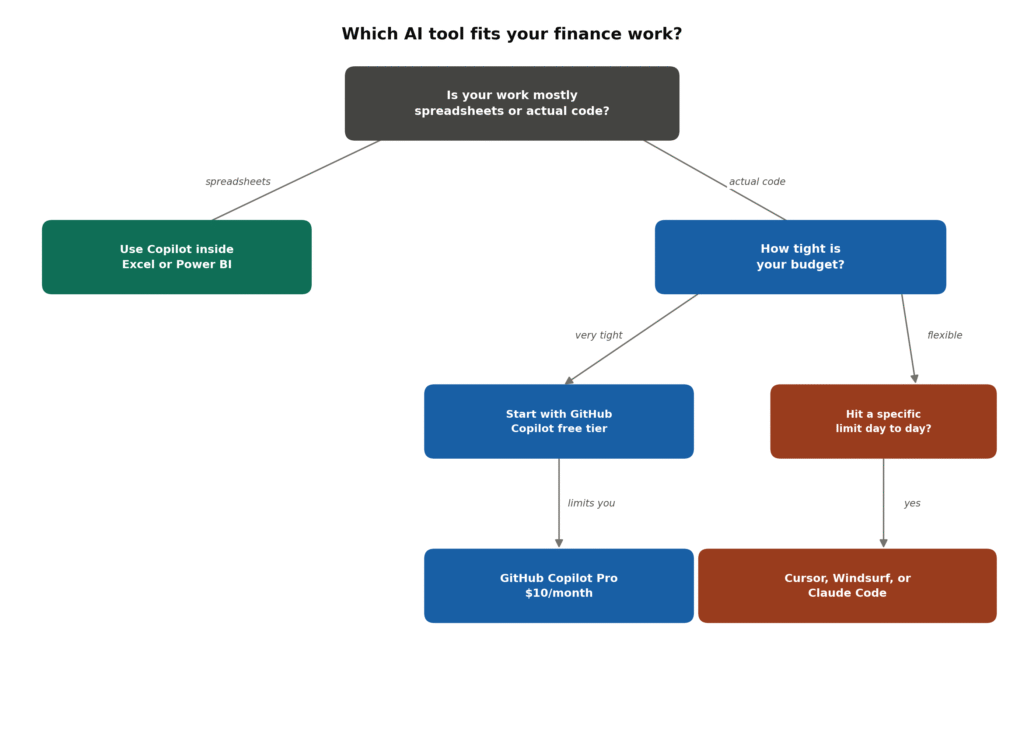
- If your work is mostly Excel or Power BI, start there. Copilot’s finance-specific skills inside those tools don’t require learning to code, and they’re already built with the caution finance work needs.
- If you’re writing actual code, start with GitHub Copilot’s free tier. It costs nothing, and within a week you’ll know whether AI coding actually changes how you work.
- Windsurf’s free tier is also worth trying if you want unlimited Tab autocomplete without paying anything, as a second free option alongside Copilot’s free tier.
- Move to Copilot Pro ($10/month) once the free tier starts holding you back. It’s the cheapest paid coding option on this list.
- Only move to Cursor, Windsurf, or Claude Code once you feel a specific limit, like a codebase too big to fit in context, or enough daily editing that faster autocomplete would genuinely help.
- Add a security scanner before anything reaches production. Snyk and SonarQube both have free or cheap plans that work for a small team.
Can I use AI coding tools to write code that touches real money safely?
Here’s the honest part: every tool on this list can hand you code that looks correct, runs fine, passes a quick read-through, and still has a mistake that only shows up once real money moves through it.
This isn’t a knock on any one tool. Veracode’s 2025 GenAI Code Security Report tested over 100 AI models across 80 coding tasks and found that AI-generated code introduced exploitable security flaws, like injection attacks and cross-site scripting, in 45% of cases, a figure that has held roughly steady through Veracode’s 2026 follow-up testing even as newer models got better at writing functional-looking code. In practical terms: the code passes a casual review because it works, while the security flaw hides underneath.
In plain terms: AI models are good at writing code that looks like working code. They’re not reliably good at catching the specific ways money-related code breaks, like decimal precision drifting during a currency conversion, a missing check that lets a payment get charged twice, or a rounding rule that’s technically correct math but wrong for how your ledger actually works.
None of this means you shouldn’t use these tools. Citi armed 30,000 developers with generative AI coding tools, according to CEO Jane Fraser, so this is already normal practice at serious financial companies. It just means you should treat any AI-written code that touches money as an untested first draft, full stop, until it goes through the same review a human developer’s code would get.
“Okay, but does that mean I need a whole security team before I can use any of this?” Not for a solo project or a small team. It means running basic security checks before anything touches real transactions, no matter how big your team is.
Choosing between them: cost, context, and language
Beyond price, two things decide which tool actually fits: how much of your codebase the AI needs to see at once, and what language your work is in.
If you’re doing complex, multi-file work, Claude Code’s larger context window earns its higher cost. If you’re making smaller day-to-day edits, Cursor, Windsurf, or Copilot are the more natural fit and generally cost less or the same.
On language: Python and SQL cover most individual finance and analyst work, from automation to data analysis. Java shows up once you’re touching existing bank or enterprise financial systems. C++ is a narrow case, mainly high-frequency trading. All four tools on this list work across all of these languages, so the language you need doesn’t limit which tool you can pick.
The tool matters less than the habit. Match it to your actual work, not to whatever tops a ranking, and treat AI-written financial code like someone’s untested first draft, because that’s exactly what it is.
If you’re building a full app rather than editing an existing codebase, it’s worth also looking at no-code and AI app-building tools built for that different use case.
FAQs
Is it safe to use AI coding tools on financial code?
It can be, but only if you treat the output as untested no matter how finished it looks. Code that touches money needs the same review process as human-written code, not a lighter one.
What’s the cheapest way to start using AI coding tools for finance work?
GitHub Copilot’s free tier costs nothing, and its Pro tier at $10/month is the cheapest paid option here. Windsurf’s free tier is also worth trying. If you don’t need to code at all, Copilot inside Excel or Power BI is often the cheapest and simplest starting point.
Which programming language should I learn for finance work?
Python and SQL cover the large majority of real finance work. Java matters mainly for existing enterprise banking systems, and C++ is a narrow choice for high-frequency trading.
Does Claude Code or Cursor handle fintech codebases better?
Claude Code’s bigger memory window suits complex, spread-out projects. Cursor suits daily, smaller edits inside a familiar editor. Many teams use both, for different tasks.
Is Windsurf a good alternative to Cursor?
Windsurf, now rebranded as Devin Desktop under owner Cognition, is a legitimate alternative with a generous free tier and access to Devin’s autonomous cloud agent. Since its 2026 pricing changes it now costs the same as Cursor Pro, so the choice mostly comes down to model preference and whether Devin’s background agent work appeals to you.
Can AI coding tools replace a developer who understands financial regulations?
No. These tools help write and check code, but knowledge about money precision, compliance, and regulations still has to come from a person who understands that world.
Do I need a security team to use AI coding tools safely in finance?
Not necessarily for a solo project or small team. But any code touching real financial transactions should go through basic security scanning before it reaches production.
What changed with GitHub Copilot pricing in 2026?
Copilot switched to usage-based billing on June 1, 2026. Pro is still $10/month and now includes a monthly credit allowance, while regular code completions stay unlimited.
Is this trend real, or is it still early and niche?
It’s already standard practice at major financial institutions. The 2026 Global AI in Financial Services Report found software engineering at pilot stage or beyond at 75% of institutions worldwide, with 42% reporting full deployment. Citi alone armed 30,000 developers with AI coding tools, according to CEO Jane Fraser on the bank’s Q4 2024 earnings call.