
Descript is a text-based editing platform that added remote recording. Riverside is a remote-recording platform that added editing tools.
You’ve probably noticed that Descript and Riverside don’t really compete with each other.
They keep copying each other’s homework instead.
Descript started as a text-based editor and added recording. Riverside started as a recording studio and added editing. Somewhere in that overlap, every other article on this topic just hands you a feature table and call it a day.
That’s not what you need.
If you’re choosing between Descript and Riverside in 2026, the real question isn’t which one has more features. It’s which one was built to solve the problem you actually have: getting a clean recording, or turning a messy one into something publishable.
What’s the difference between Descript and Riverside?
Descript is a text-based editing platform that added remote recording as an acquired feature. Riverside is a remote recording platform built for studio-quality audio and video, with editing tools layered on top.
If your bottleneck is getting a usable recording, start with Riverside. If your bottleneck is turning footage into a finished episode, start with Descript.
The quick verdict
Riverside wins on recording reliability and live streaming. Descript wins on AI-assisted post-production and repurposing long content into clips.
A fair number of serious podcasters end up paying for both, using each one for what it’s actually built for.
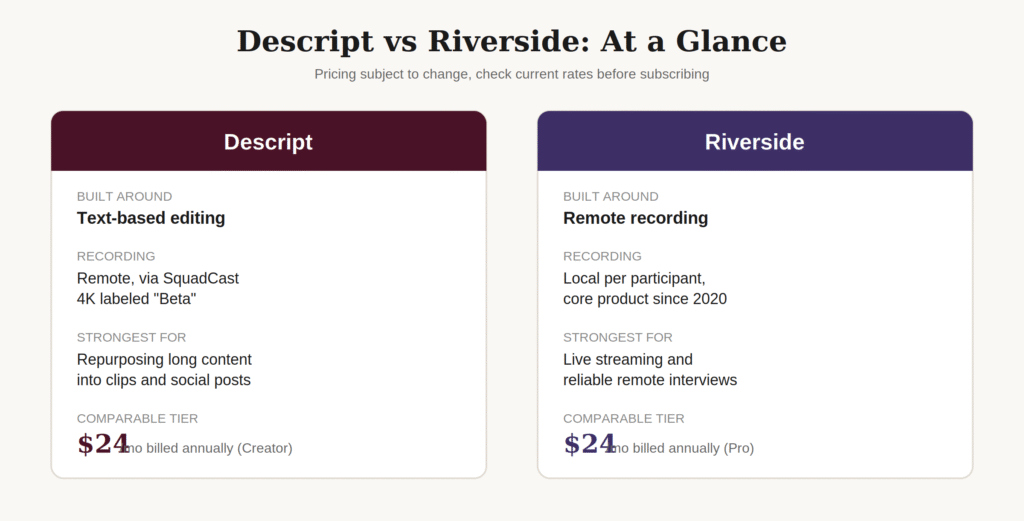
But let’s be honest: neither vendor’s own comparison page will tell you that straight. They both write their “vs” pages the way you’d expect them to. The one detail that actually matters gets buried or skipped entirely.
The fact neither vendor page will tell you straight
Here’s the thing nobody leads with: Descript’s remote recording isn’t something Descript built from scratch.
It runs through SquadCast, a separate company Descript acquired and folded into its platform. Descript’s own blog confirms the acquisition rolled out in phases, starting as a standalone product before full integration into the main app.
I went straight to Descript’s help center to see how the company describes this feature today, not how its marketing page frames it.
As of this writing, Descript’s own documentation still labels 4K remote recording “Beta.” It also states the feature requires a Creator or Business plan, a 4K-capable camera, and runs best on Mac. Windows browser recording is capped at a lower bitrate.
That’s not a small caveat buried in fine print. It’s the platform’s own support team telling you the feature isn’t finished. Riverside’s own comparison page makes the same claim independently, stating plainly that Descript’s 4K local recording is in Beta, which is one competitor confirming what the other’s documentation already says.
Riverside’s recording engine isn’t a bolt-on. It’s been the platform’s core product since 2020, built in-house and refined for years before Riverside added editing tools at all.
That one distinction changes how you should read every other feature in this article. Descript’s recording is newer and narrower in device support, and still officially labeled experimental. Riverside’s editing tools are the newer addition on its side.
Neither company will say that plainly on its own site. Now you know it before you read further.
The real cost of picking the wrong tool here isn’t the subscription fee. It’s the recording you lose when a feature still labeled “Beta” does exactly what beta features are known to do.
So what does that mean feature by feature? Here’s the side-by-side.
Descript vs Riverside: feature comparison
| Feature | Descript | Riverside |
| Recording engine | Runs through SquadCast (acquired), 4K labeled “Beta” | Built in-house since 2020, core product |
| Recording type | Remote, browser-based | Local recording per participant, then upload |
| Max video quality | Up to 4K export (Creator tier and above) | Up to 4K video, 48kHz audio |
| Editing style | Text-based, edit the transcript to edit the media | Timeline plus AI editing/repurposing agent |
| Live streaming | Not available | Yes, from the Grow tier up, multi-platform |
| Podcast hosting | Not built in | Yes, included from Grow tier up |
| AI voice tools | Overdub, AI Speech, voice regeneration | Not a core feature |
| Repurposing / clips | Magic Clips, AI-generated short clips | Magic Clips and show notes, AI editing agent |
| Filler word removal | Yes | Yes |
| Transcription | Yes | Yes |
| Best device support | Strongest on Mac | Consistent across Mac and Windows |
The overlap is real. Where they genuinely differ is recording maturity on one side, and native streaming and hosting on the other.
Descript vs Riverside Pricing
Pricing trips people up more than any other part of this decision.
Both platforms lead with a discounted annual rate, so the number you see first isn’t always the number you’ll pay.
Here’s what each one actually charges.
| Plan | Descript | Riverside |
| Free | $0 | $0 |
| Entry paid tier | Hobbyist: $16/mo annual ($24/mo monthly) | Pro: $24/mo annual ($29/mo monthly) |
| Most comparable tier | Creator: $24/mo annual ($35/mo monthly) | Grow: $34/mo annual ($39/mo monthly) |
| Higher tier | Business: $50/mo annual ($65/mo monthly) | Webinar: $79/mo annual ($99/mo monthly) |
| Top tier | Enterprise: custom | Business: custom |
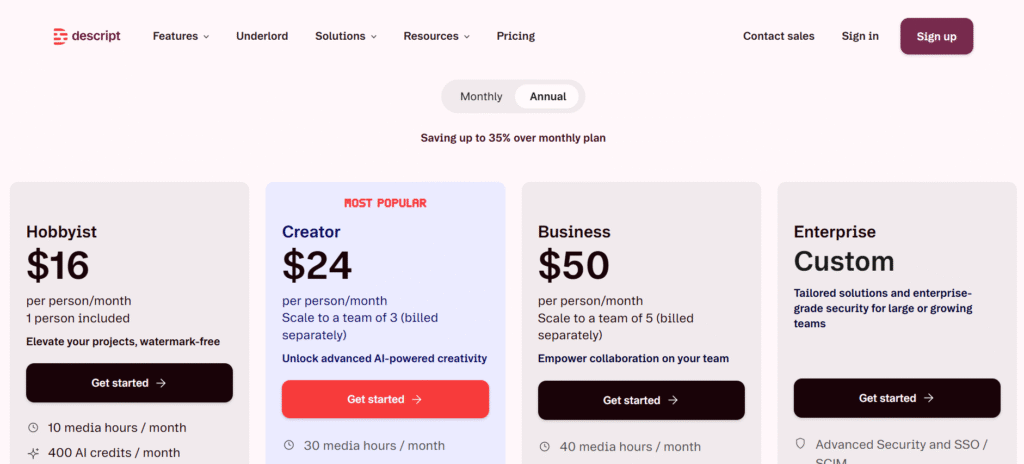
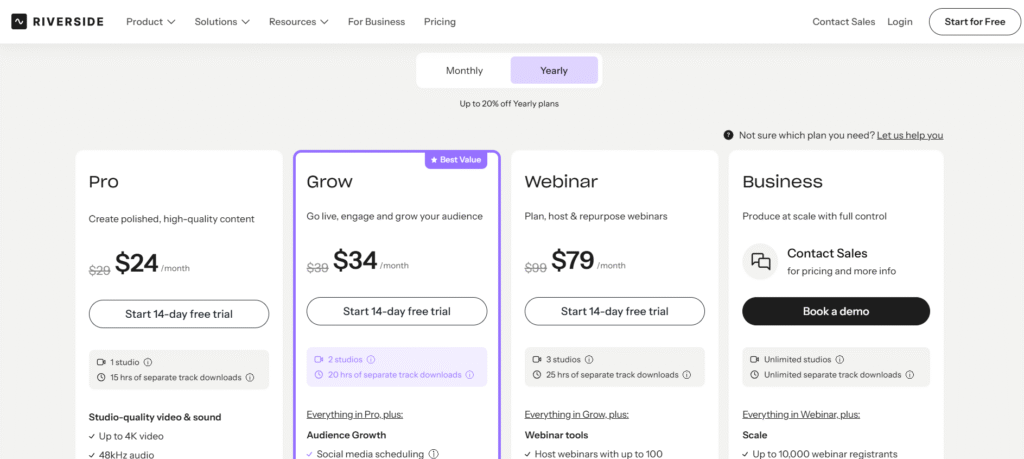
Both companies discount the annual rate to make it the headline number. Descript’s monthly rate, if you’re not ready to commit for a year, runs noticeably higher.
Descript’s Hobbyist tier looks cheaper than Riverside’s Pro tier at first glance. But Hobbyist doesn’t include 4K export or full access to Descript’s AI toolset.
At current pricing, the tier that actually matches Riverside Pro’s feature set is Descript Creator. Both land at $24 a month annually. At that point, the pricing gap disappears, and the decision comes down to what each platform does better, not what it costs.
“Okay, but what’s this actually going to cost me if I use both?” We’ll price that out shortly. First, the actual use case breakdown.
When Descript is the right pick
Descript makes sense if your bottleneck happens after the recording, not during it.
If you’re taking long-form audio or video and turning it into clips, blog posts, and social content at scale, Descript’s text-based editing model is built for exactly that.
Editing a transcript to edit the audio or video, instead of scrubbing a timeline, is the single biggest reason Descript shows up in so many workflows.
Add in Studio Sound for audio cleanup, Overdub for voice correction, and Magic Clips for repurposing. Descript’s strength is clearly in what happens to your footage after it’s already recorded.
For a closer look at everything Descript offers on its own, see our full breakdown of Descript’s features and pricing.
When Riverside is the right pick
Riverside makes sense if your show depends on the recording itself holding up.
Remote interview formats, live streaming to an audience, or webinars where you can’t afford a dropped connection all favor a platform where recording is the core product, not an add-on.
Riverside’s paid tiers include local recording up to 4K video and 48kHz audio, multiple simultaneous studios depending on plan, and live streaming to multiple platforms starting on its Grow tier.
Each participant’s audio and video record locally on their own device first, then upload. That’s what protects you from a bad connection ruining the take.
Where it genuinely doesn’t matter which you pick
Both platforms include:
- Transcription, with generally solid accuracy on clear audio
- Filler word removal
- Text-based editing of your recording
- Clip generation for short-form content
- Separate audio and video tracks per speaker
If your needs stop at this list, either platform gets the job done. The deciding factor becomes price, interface preference, or whichever one your team already knows.
Sounds simple enough on paper. Here’s where it gets more complicated once you look at where each platform actually strains.
Does Descript’s recording actually hold up?
This is the part vendor comparison pages skip almost entirely. Neither company wants to admit where its own product still struggles.
Think about the worst version of this: you’ve booked a founder for a 40-minute interview, they showed up on time, the conversation was good, and then the export takes three times longer than usual or the file comes back with the guest’s audio out of sync. That’s not a hypothetical. It’s the exact failure point both platforms get flagged for when a project runs long or heavy.
Descript’s editing side earns its reputation honestly. Turning a transcript edit into a video edit is a genuinely different way of working, and it removes most of the learning curve of a traditional timeline editor.
Where Descript tends to strain is on longer or heavier projects. A tool built around AI credits, avatars, translation, and a full editing suite is doing more work under the hood than a recording-first platform. That shows up most on your longest episodes, not your shortest ones.
Riverside’s pitch is the opposite kind of simplicity: one platform for recording, editing, and clipping, without stitching together three separate tools. That’s a real advantage for a solo host who doesn’t want a production pipeline.
The tradeoff shows up in Riverside’s newer parts. Live streaming, webinar tools, and podcast hosting are all recent additions layered onto a recording-first product. It’s the same pattern Descript went through in reverse when it bolted recording onto an editing-first tool.
Honest take: neither platform is staying in its original lane. Descript keeps expanding past editing. Riverside keeps expanding past recording. Both are trying to become the only tool you need, and that’s exactly why this comparison keeps getting harder to answer with a simple “pick one.”
What Trustpilot reviewers actually say
Vendor pages tell you what each company wants you to believe. Trustpilot tells you what happened after people actually paid.
As of July 2026, Descript sits at 3.0 out of 5 from 268 reviews. Riverside sits meaningfully higher, at 3.8 out of 5 from 480 reviews.
The Descript number is more polarized than the average suggests. Close to 40% of reviewers give it 5 stars, and close to 39% give it 1 star, with very few landing in the middle. People either love the editing workflow or feel burned by something else entirely.
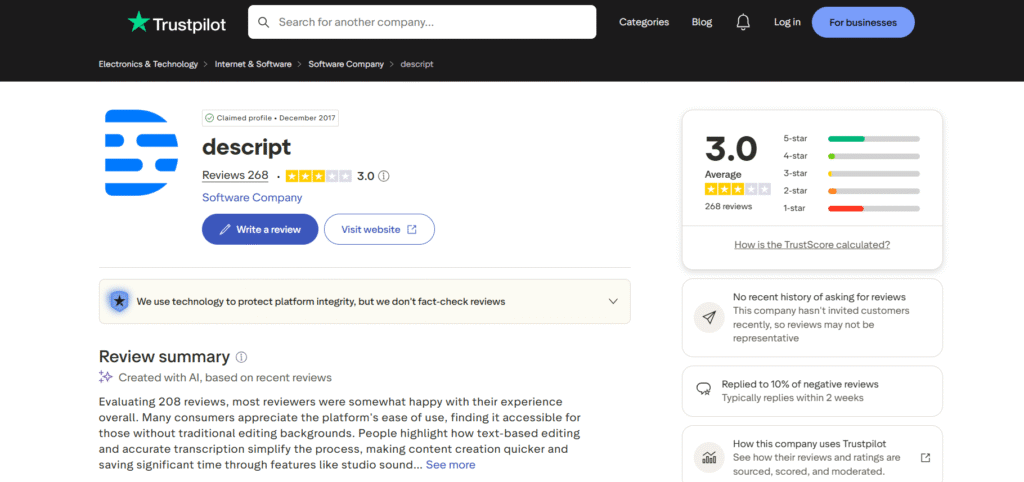
That “something else” shows up again and again in the actual reviews: pricing and plan changes. One reviewer described losing 1080p export access overnight unless they upgraded to a pricier plan, despite already paying for a mid-tier subscription. Another described being charged for an annual renewal on an account that had sat untouched since 2023, then receiving what read like a copy-paste policy response instead of a real look at the situation.
Riverside’s reviews skew far more positive, and the praise clusters around one specific thing: recording quality that reviewers describe as studio-grade, paired with an interface simple enough for people with no editing background at all.
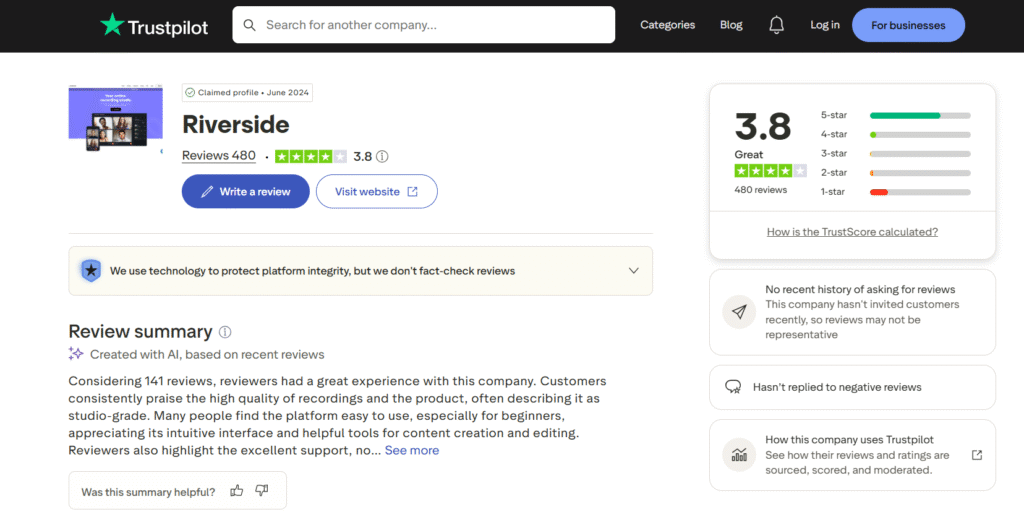
Riverside isn’t complaint-free either. Reviewers have reported the desktop app breaking with no fix offered, and one recent review described the platform failing outright for most of a session. Riverside’s own 1-star share, sitting at 18%, is real and shouldn’t get waved away just because the average looks better.
Read together, the pattern lines up with everything else in this comparison. Riverside’s complaints tend to be about the software breaking mid-use. Descript’s complaints tend to be about money changing hands without warning.
Neither is a dealbreaker on its own. But if you’ve ever had a subscription quietly change on you, or a tool freeze mid-recording, you already know which one would bother you more
What it actually costs to run both
Plenty of people mention using Riverside for recording and Descript for editing as a common workflow. Almost none of them price it out.
Here’s the actual math:
- Riverside Pro (annual): $24/month
- Descript Creator (annual): $24/month
- Combined monthly cost: $48/month
- Combined cost if billed monthly instead: Riverside Pro at $29 plus Descript Creator at $35, totaling $64/month
That’s a real number to weigh against subscribing to just one platform and accepting its weaker side.
For many solo creators, $48 a month for reliable recording plus strong post-production tools is a reasonable trade.
The scorecard
Here’s the whole comparison in one place, if you just want the shorthand:
| Category | Descript | Riverside |
| Recording reliability | Newer, still labeled Beta | Core strength since 2020 |
| Editing depth | Strongest of the two | Solid, not the main focus |
| Repurposing into clips | Strongest of the two | Included, less mature |
| Live streaming | Not available | Strong, native from Grow tier |
| Podcast hosting | Not built in | Included from Grow tier |
| Beginner learning curve | Steeper, more features to learn | Gentler, single core task |
| Entry price (comparable tier) | $24/mo annual | $24/mo annual |
If your row of concern is recording, Riverside leads. If it’s editing and repurposing, Descript leads. Everything else is a tiebreaker based on your workflow, not the tools themselves.
Should you use Descript, Riverside, or both?
If your show lives or dies on the quality of the recording itself, start with Riverside. Nothing you edit afterward matters if the interview never made it to your hard drive in one piece.
If your time is mostly spent turning raw footage into a finished, repurposed piece of content, start with Descript. That’s the platform built for the hours you’re already losing to editing, not the hours you spend recording.
And if you’ve got the budget and a workflow that genuinely uses both strengths, running Riverside for recording and Descript for editing isn’t overkill. It’s just the honest version of what everyone else in this space hints at but never actually recommend outright.
Frequently asked questions
Is Descript or Riverside better for podcasting?
It depends on your bottleneck. Riverside is generally the stronger pick for recording reliability, especially for remote interviews and live streaming. Descript is the stronger pick for post-production depth, particularly AI-assisted editing and content repurposing.
Does Descript’s 4K recording actually work well?
Descript’s own help documentation still labels 4K remote recording “Beta” as of mid-2026, and it requires a Creator or Business plan, a 4K-capable camera, and works best on Mac. Riverside has offered 4K local recording as a core, non-beta feature since 2020.
Is Riverside cheaper than Descript?
At the entry paid tier, they’re close. Riverside Pro runs $24/month billed annually, or $29/month billed monthly. Descript Hobbyist is cheaper at $16/month annually, but Descript’s more comparable Creator tier, with 4K export and the full AI toolset, matches Riverside Pro at $24/month annually.
Can you use Descript and Riverside together?
Yes, and it’s a common workflow. Record the interview in Riverside for local 4K and 48kHz reliability, then import the footage into Descript for text-based editing, filler word removal, and repurposing into clips or show notes.
Does Descript have live streaming like Riverside?
No. Descript does not offer native live streaming to platforms like YouTube or LinkedIn. Riverside includes multi-platform streaming as a core feature starting on its Grow plan.
Is Descript’s recording feature the same as Riverside’s?
No. Descript’s remote recording runs through SquadCast, a company it acquired and is still integrating into its main platform. Riverside’s recording engine has been built in-house and refined since the platform launched.
Which is easier to learn, Descript or Riverside?
Riverside is generally faster to pick up, especially if you’ve never used either platform before, since the interface is built around one task: record, then hit publish. Descript’s broader feature set has a steeper learning curve at first, though its core transcript-editing workflow becomes intuitive quickly once you get used to editing by text instead of a timeline.