
Sports streaming has become an expensive mess. A full legal setup (NFL Sunday Ticket, NBA League Pass, an MLB TV subscription, a live TV bundle for regional games) can easily cost more than cable ever did. That’s the gap Uzzu TV steps into: a single subscription that claims to cover all major American sports leagues, with no blackouts, for around $22 a month.
Uzzu TV has built real name recognition among cord-cutters. But it’s also accumulated a complicated reputation (mixed reviews, unresolved refund complaints, questions about its legal status, and a setup process that surprises people who expect something as simple as Netflix). Before you hand over your payment details, here’s everything the marketing page won’t tell you.
What Uzzu TV actually is (and why it works differently)
Uzzu TV is not a conventional streaming service. It doesn’t live in the Apple App Store or Google Play. You won’t find it listed in the Amazon Appstore alongside Netflix and Disney+. That’s not an oversight. It’s the nature of how the service operates.
Unlike mainstream streaming platforms, Uzzu TV doesn’t have an official app in standard app stores. Instead, subscribers receive a streaming link (an M3U playlist) to use with third-party IPTV apps like IPTV Smarters, TiviMate, or Smart IPTV.
This is what makes Uzzu different from services like FuboTV or YouTube TV. It operates through the IPTV model, which means streams are delivered through a link your device plays through a compatible player. For experienced cord-cutters, that’s normal. For someone who just wants to watch Sunday football on their TV, the setup is more involved than expected.
That distinction matters because it explains almost everything about Uzzu: why it’s cheaper, why setup requires extra steps, and why legal questions are genuinely difficult to answer with certainty.
What you get: channels, sports, and coverage
Uzzu TV varies from other providers as it focuses specifically on live sports streams rather than an all-inclusive entertainment package. The lineup covers NFL, NBA, MLB, NHL, MMA, boxing, soccer, and PPV events.
The service offers over 100 live sports channels and events, including baseball, football, hockey, rugby, soccer, and MMA.
One of the strongest selling points is the no-blackout claim. Uzzu compresses the fragmented, expensive world of sports streaming into a cheaper offer, which is a powerful hook for out-of-market fans who follow teams outside their local region.
There’s also a game schedule on the website showing upcoming events by day, which is a genuinely useful feature that most gray-market IPTV services skip entirely.
What Uzzu doesn’t offer: DVR, replay, on-demand library, or the ability to pause live TV. This is a deliberate trade-off. Stripping out extras keeps the price low.
Pricing: the three plans explained
Uzzu TV offers three subscription tiers: $8.99 per week, $21.99 per month, and $129.99 per year.
At roughly $10.83 per month on the annual plan, it’s aggressively priced compared to legal sports streaming alternatives. For context, NFL Sunday Ticket alone runs over $400 per year.
The pricing is displayed publicly on the website, with no forced sign-up to see the numbers. Uzzu also states that there is no auto-billing and that subscriptions renew manually, which is one of the few areas where the service behaves more restrained than most subscription businesses.
Important caveat: the 24-hour money-back guarantee is short, and numerous users have reported that Uzzu does not honor the refund policy. Understanding what you’re committing to before signing up is essential. If you’re unsure, the weekly plan is the lowest-risk way to test the service.
A note on domains: Uzzu TV’s branding appears across several different web addresses, including uzzu.tv, uzzutv.io, and uzzutv.tv, and pricing, features, and policies vary between them. This review is based on the original uzzu.tv sports-streaming service and its $8.99/week, $21.99/month, and $129.99/year pricing, which is the version most commonly referenced in user reviews and independent coverage. If you land on a different Uzzu-branded domain advertising a free trial or different pricing, treat it as a separate entity and verify independently before paying.
How to watch Uzzu TV on your TV: device setup explained
This is the part where new subscribers get confused.
Uzzu TV is compatible with Firestick, Fire TV, Android TV, Google TV, Chromecast, Roku, Nvidia Shield, Xbox, smart TVs (Samsung, LG, TCL, Sony), Apple TV, iOS, and Android phones. But “compatible” doesn’t mean “install and done.”
On Firestick or Fire TV:
Because Uzzu’s app is not in the Amazon Appstore, you need to sideload it. This means enabling “Apps from Unknown Sources” in your Firestick settings, installing the Downloader app, then using Downloader to pull the Uzzu APK from their servers. Once installed, the app shows a code on screen that you enter at uzzu.tv/member/link in a browser to activate your account on that device. Setup instructions are available directly at support.uzzu.tv/help/watch-on-firetv.
On Google TV or Android TV (Chromecast, Nvidia Shield):
Uzzu recommends four IPTV apps for Google devices: Smart One IPTV, Smart IPTV, Net IPTV, and IPTV Extreme. You install one of these apps, note your device’s MAC address from the app’s first screen, then email that MAC address to support@uzzu.tv to have your account configured. Full instructions are at support.uzzu.tv/help/watch-on-google-devices.
On Smart TVs (Samsung, LG, TCL, Sony):
The process mirrors the Google TV setup. Download a compatible IPTV app from your TV’s app store, get your MAC address, and email Uzzu support to configure it. Instructions live at support.uzzu.tv/help/watch-on-smart-tvs-smart-devices.
On Apple devices (Apple TV, iPhone, iPad):
Uzzu now offers a free app called NUFU: Smart IPTV Player for Apple products. Instructions are at support.uzzu.tv/help/watch-on-apple-products.
The honest takeaway: setup is manageable if you follow the documentation, but this is not a plug-in-and-play experience. If you’ve never sideloaded an app or configured an IPTV player, budget an hour and have the support page open. Once it’s working, the day-to-day experience is generally straightforward.
Is Uzzu TV legal? The honest answer
This is the question most people searching Uzzu TV actually want answered, and most reviews dance around it.
Uzzu TV’s official support page states that the service is “a legal streaming platform that provides live sports games with proper licensing agreements in place” and that it is based in the United States.
That claim is impossible to independently verify. No licensing agreements are disclosed publicly. The mailing address listed for Uzzu TV is associated with numerous other businesses registered in Wyoming (a state known for low-cost business registration) and the address has been flagged in relation to shell company activity. None of this definitively proves the service is illegal, but it does mean there’s no transparent licensing infrastructure a subscriber can point to.
The practical risk for users isn’t criminal prosecution. That’s not how streaming copyright enforcement typically works. The more realistic exposure includes streams disappearing if rights holders issue takedowns, account termination without refund, ISP throttling during high-demand events, and no legal recourse if the service stops working or disappears entirely.
If you pay for a year in advance and the service goes down, you have limited options.
What real users are saying in 2026
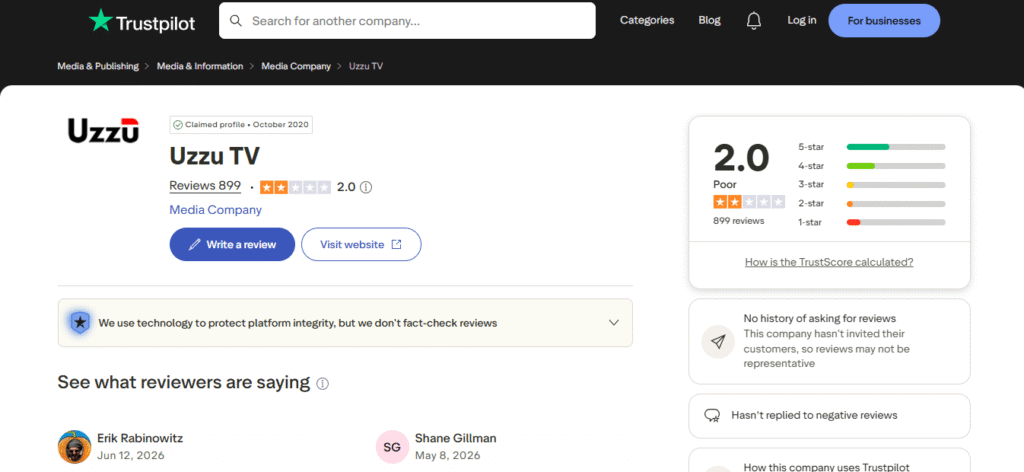
On Trustpilot, Uzzu TV holds a 2.0 out of 5 rating, with recurring complaints about constant buffering, lag, and a 5-minute stream delay.
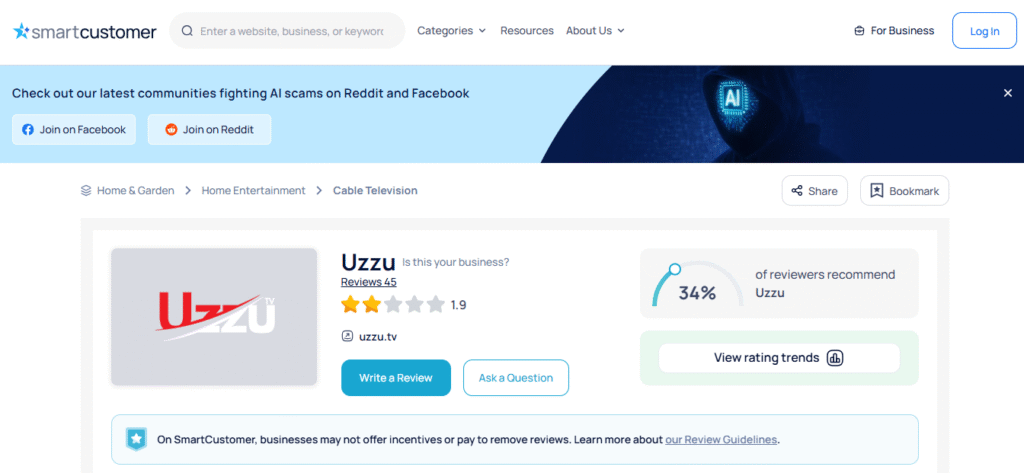
On Sitejabber, the rating sits at 1.9 out of 5.
The picture that emerges from user reviews is a service that works well for some subscribers over years and fails others repeatedly, often during the exact moments that matter most.
One longtime user reported that the service has gone downhill recently with the removal of many channels and support that used to be very responsive but is now unresponsive.
At least one user reported paying for a full year of service, getting blocked without explanation, and finding Uzzu’s support mailbox full with no response, a situation they described as a ripoff.
On the positive side, there are also multi-year subscribers who describe it as the best deal in sports streaming for their needs, particularly users who prioritize the annual price-per-sport value and haven’t hit major technical issues.
The honest pattern: Uzzu performs well on lower-demand days and struggles during peak events like NFL Sundays and major playoff games, precisely when a paying subscriber needs it most.
The problems worth knowing before you subscribe
Buffering during peak games. Multiple independent reviews and user complaints confirm that streaming quality is inconsistent during high-viewership events. A reliable internet connection (25 Mbps minimum is recommended for HD IPTV) reduces but doesn’t eliminate this.
Customer support quality has declined. Users who had previously praised Uzzu’s responsive support have reported in recent months that issues go unresolved and emails go unanswered.
Refunds are difficult in practice. The service advertises a 24-hour money-back guarantee, but user reports consistently indicate that getting a refund (especially on longer plans) is harder than the policy suggests. There’s no automatic cancellation or self-service refund option. Multiple users have only recovered their money by escalating directly through PayPal. If you’re testing the service for the first time, the weekly plan keeps your financial risk low.
Account blocks without explanation. Several users have reported being blocked from their accounts without violating any stated guidelines and without receiving an explanation.
No DVR or replay. If a game is live and your stream freezes or drops, you miss that moment. There’s no catch-up option.
Website is inaccessible outside the United States. Uzzu TV’s website is geo-restricted. Visitors from outside the United States encounter a Cloudflare block and cannot access the site at all. If you travel internationally or use a non-local VPN, you may lose the ability to manage your account, renew your subscription, or reach support entirely. This is worth factoring in before committing to an annual plan.
Uzzu TV vs. legal sports streaming alternatives
How does the value actually compare?
| Service | Monthly Cost | Legal | App Store Available | Key Sports |
| Uzzu TV | $21.99/month or $129.99/year (~$10.83/mo) | Unverified | No | NFL, NBA, MLB, NHL |
| FuboTV | $73.99-$83.99/month (Pro to Elite) | Yes | Yes | NFL, NBA, MLB, NHL, soccer |
| YouTube TV | $82.99/month (or from $54.99 for genre-specific plans) | Yes | Yes | All major sports |
| Peacock | $7.99-$16.99/month | Yes | Yes | NFL (select), Premier League |
| ESPN Select | $12.99/month or $129.99/year | Yes | Yes | MLB, NHL, MMA, college |
| ESPN Unlimited | $29.99/month or $299.99/year | Yes | Yes | Full ESPN linear bundle, NFL, NBA, college |
Uzzu is meaningfully cheaper than any full legal bundle for multi-sport coverage. That’s the real draw. But legal services offer reliability guarantees, real customer support, actual refund policies, and won’t disappear overnight.
The question isn’t which is cheaper. It’s which risk profile you’re comfortable with.
Who should and shouldn’t subscribe
This works for you if:
- You’ve used IPTV services before and understand the setup process
- You want multi-league coverage at a fraction of cable pricing
- You’re willing to test the weekly or monthly plan before committing annually
- You have a reliable internet connection of 25+ Mbps
This probably isn’t for you if:
- You expect the same reliability guarantee as a licensed streaming service
- You’re not comfortable with sideloading apps or configuring third-party IPTV players
- You watch primarily during peak events like Sunday NFL games where buffering risk is highest
- You want DVR, replay, or on-demand content alongside live sports
Conclusion
Uzzu TV occupies a real gap in sports streaming. It’s one of the few services that bundles major American leagues at a price most fans can stomach. For sports fans who understand what they’re buying (an IPTV service with unverified licensing, a manual setup process, and mixed reliability), it can deliver genuine value week-to-week.
But it asks you to absorb risks that licensed services handle on your behalf: reliability during critical games, refund access if things go wrong, and continuity if the service changes or disappears. Start with the weekly plan before committing to a year. If setup works smoothly and streams hold during your first few game days, the annual price is hard to beat.
For more on how different streaming services handle sports coverage and device compatibility, explore TheDiscoverAI’s coverage of streaming and IPTV tools.
FAQs
Is Uzzu TV legal?
Uzzu TV’s legality is unverified. The service claims to hold proper licensing and to be based in the United States, but it has not publicly disclosed any licensing agreements, is absent from major app stores, and uses a registered address associated with Wyoming shell companies. Independent reviewers including TroyPoint have been unable to confirm legal status. Users should treat this as an unverified IPTV service and assess their own comfort with that uncertainty before subscribing.
Is Uzzu TV safe to use?
A VirusTotal scan of the Uzzu TV website has shown no malware associated with the URL. However, the operators of the service are not publicly identified, which is a security consideration. TroyPoint and other reviewers recommend using a VPN when accessing unverified IPTV services to protect your IP address and internet traffic.
How much does Uzzu TV cost?
Uzzu TV offers three plans: $8.99 per week, $21.99 per month, and $129.99 per year (approximately $10.83/month). The annual plan is the most economical option. The service states there is no auto-renewal. Subscriptions renew manually only.
Does Uzzu TV offer a free trial?
Uzzu TV does not offer a free trial. New subscribers pay upfront and receive a 24-hour money-back guarantee. Multiple user reviews note that obtaining this refund in practice can be difficult, particularly on longer subscription plans. The weekly plan is the lower-risk option for first-time subscribers.
How does Uzzu TV compare to FuboTV for sports streaming?
FuboTV is a fully licensed, app-store-available streaming service with guaranteed uptime, real customer support, and DVR functionality, with plans ranging from about $73.99 to $83.99 per month depending on the tier. Uzzu TV costs significantly less on its annual plan, but comes with unverified licensing, a more manual setup process, inconsistent reliability during peak events, and limited support responsiveness. FuboTV offers more legal certainty and reliability; Uzzu offers a lower price point with higher uncertainty.
Why isn’t Uzzu TV available in the Amazon or Google Play Store?
Uzzu TV is not available in major app stores because it operates as an IPTV service that delivers streams through M3U playlists and third-party IPTV players rather than through a standalone certified app. Apps distributed through Amazon and Google must meet content licensing and policy requirements that IPTV services with unverified licensing cannot satisfy. This is why installation requires sideloading on Firestick or using separate IPTV player apps on other devices.