
Every roundup of Midjourney alternatives says the same thing: “we tested these tools.” Most of them didn’t. You get a feature list pulled from a pricing page and a verdict that could have been written without opening a single one of them.
This one is different. I ran the same prompt through five Midjourney alternatives on the same day and compared the actual outputs side by side. The prompt was specific on purpose: a coffee shop sandwich board sign with the exact text “FRESH ROAST DAILY” written on it. Text inside images is one of Midjourney’s most well-known weak spots, and it’s the kind of real-world creative task marketers and small business owners actually need done.
Midjourney alternatives are AI image generation tools that create images from text prompts without Midjourney’s Discord-based, subscription-only model. The five worth knowing in 2026 are Adobe Firefly, Leonardo AI, ChatGPT’s image tool, Ideogram, and Bing Image Creator, each trading off differently on price, text accuracy, and commercial licensing. All five are free to test without a credit card, which is more than Midjourney itself can say.
Here’s what I found.
Why Midjourney has no free trial in 2026
Before getting into the alternatives, one thing worth saying plainly: Midjourney is not in this test because it has no free tier. It is subscription-only starting at $10 a month for the Basic plan. The free trial it once offered was pulled years ago after widespread abuse, and it has not returned. That is one of the main reasons people search for alternatives in the first place.
If you’re already paying for Midjourney and happy with the image quality but frustrated by something specific like Discord friction, pricing, or text rendering, the tools below are the honest comparison. If you’ve never paid for Midjourney and are trying to figure out what’s worth using for free, every tool on this list gives you a real starting point at no cost.
Worth saying plainly: Midjourney holds a strong 4.4-out-of-5 rating on G2, so most people looking at alternatives aren’t switching because the image quality let them down. It’s usually Discord friction, subscription cost, or one missing feature, not dissatisfaction with the actual output.
The test: one prompt, five tools, no editing
The prompt used across all five tools, no style presets or extra settings changed:
“A coffee shop sandwich board sign on a sidewalk that reads ‘FRESH ROAST DAILY’ in bold hand-painted lettering, morning light, blurred street in the background”
This prompt tests two things at once: how realistic the overall scene looks, and whether the tool renders exact text accurately, which is where most AI image generators quietly fall apart. A few, as you’ll see below, get creative and add things that weren’t asked for at all.
Midjourney alternatives at a glance
| Tool | Text accurate? | Free tier | Starting paid price | Best for |
| ChatGPT | Yes, clean | Yes, limited daily images | $8/month (Go) | Instruction-following, beginners |
| Leonardo AI | Yes, clean | Yes, 150 tokens/day | $12/month (Essential), or $10/month billed annually | Distinct visual style, free volume |
| Adobe Firefly | Yes, slightly rough | Yes, 25 credits/month | $9.99/month (Standard) | Commercial safety, Adobe users |
| Ideogram | Yes, on all 4 results | Yes, free credits with sign-in | $20/month (Plus), or $15/month billed annually | Text-heavy design work |
| Bing Image Creator | Yes, on all 4 results | Fully free | No paid tier | Zero-cost, no account friction |
ChatGPT: the cleanest single result
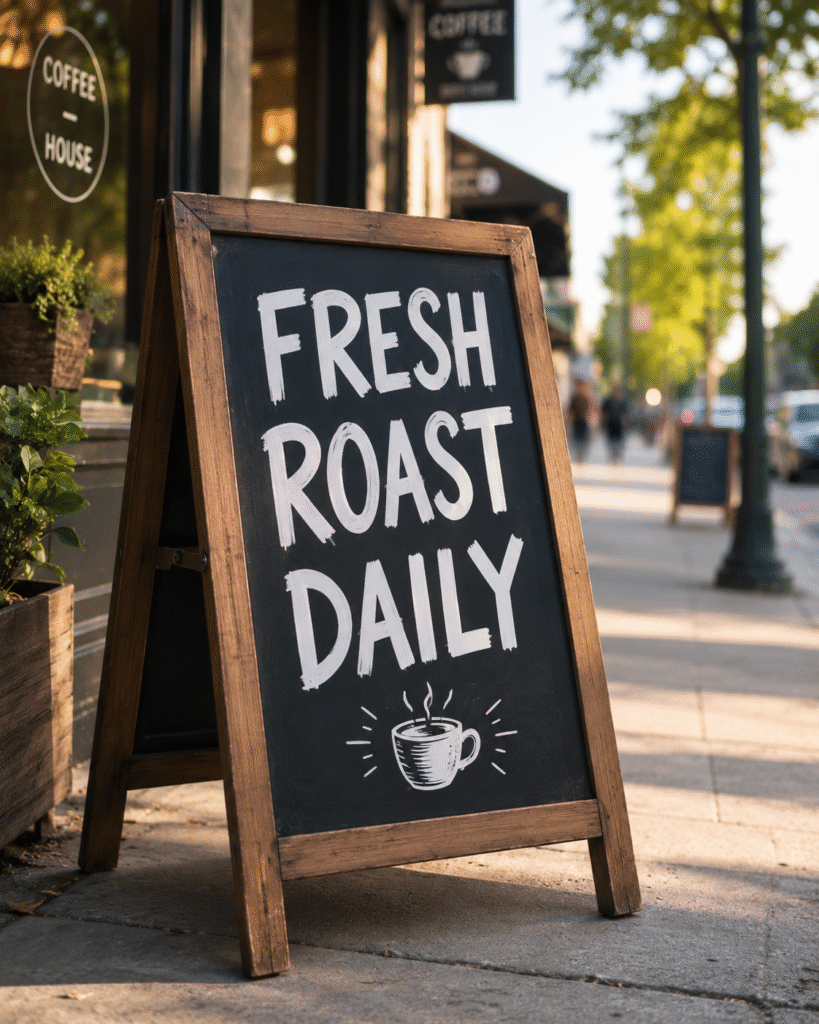
I typed the prompt directly into the ChatGPT chat box with no model selection required. The result came back as a single image.
What came back was the most visually complete result of the five: a black chalkboard in a solid wooden frame, the exact words “FRESH ROAST DAILY” in bold white lettering down to the last letter, a small drawn coffee cup icon below the text, and a warm morning street scene with blurred trees and pedestrians behind it. The composition matched the prompt closely and the light felt natural rather than overexposed.
The one thing ChatGPT added that wasn’t asked for is that coffee cup drawing. It’s a creative interpretation, not an error, and it works in context, but if you need the sign to show only the exact text, add “no additional illustrations” to the prompt.
Free tier: limited daily image generations, shared with your regular ChatGPT message allowance. Go plan at $8/month raises both limits. Plus at $20/month is where image generation becomes a proper production tool.
Best for: people who already use ChatGPT for writing or research and want images without managing a separate subscription.
Not for: high-volume batch generation on a free tier.
Leonardo AI: most distinct visual tone
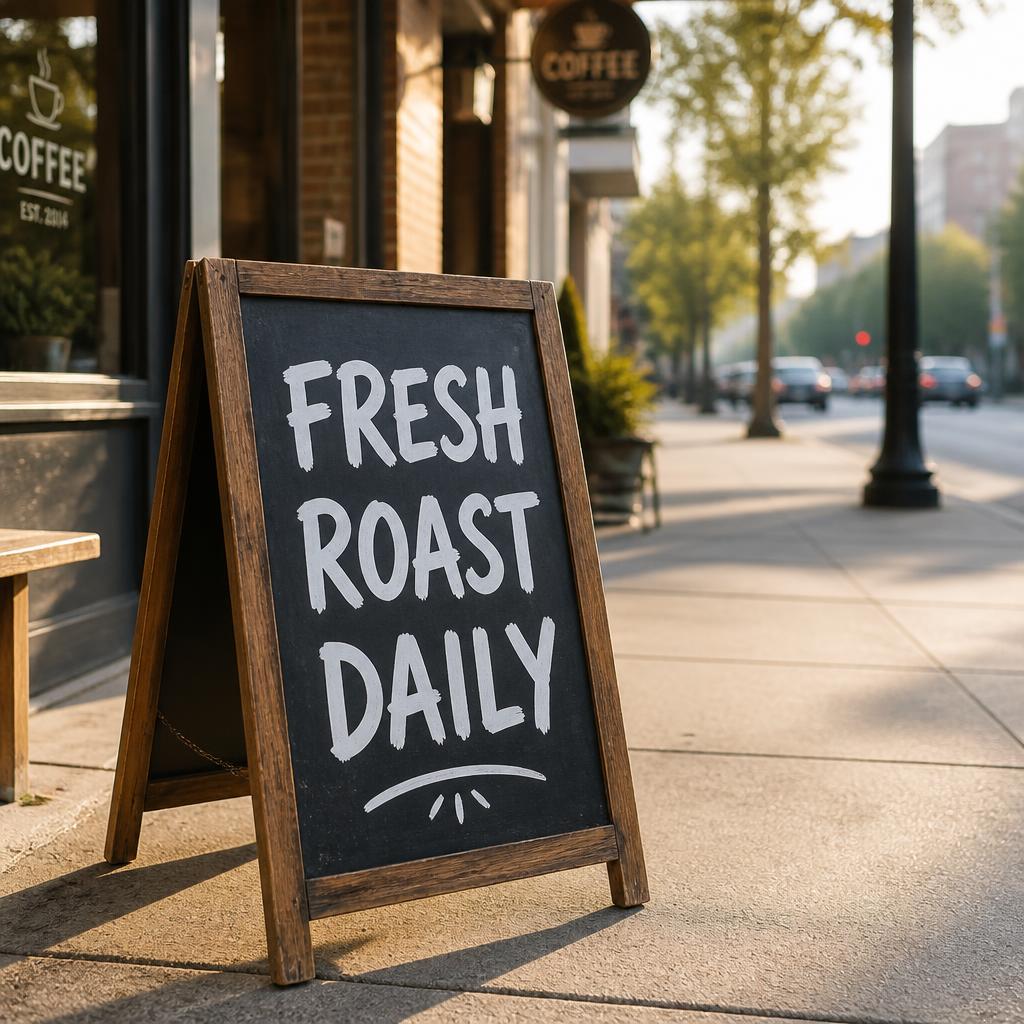
Leonardo’s interface showed a live token count before I generated anything, and I kept the default “Auto” model with no style setting changed. The result came back as a single image.
What came back looked noticeably different from ChatGPT’s result despite the identical prompt. Same black chalkboard, same wooden frame, same accurate “FRESH ROAST DAILY” text in white chalk lettering, but the scene behind it felt more like a real urban street at 7am: long shadows, a traffic light in the background, parked cars, a cooler and quieter mood. Where ChatGPT’s result felt warm and composed, Leonardo’s felt candid, and nothing was added beyond what the prompt asked for.
Free tier: 150 fast tokens per day, resets every 24 hours, public creations. Paid plans, checked directly on Leonardo’s pricing page: Essential at $12/month ($10/month billed annually) with 8,500 fast tokens, Premium at $30/month ($24/month annually) with 25,000 tokens, and Ultimate at $60/month ($48/month annually) with 60,000 tokens. Private generation starts at Essential.
Best for: creators who want a more distinct, less “polished” visual style and don’t mind tracking a token balance.
Not for: anyone who needs private generations on a free account.
Adobe Firefly: most cinematic feel, but requires setup
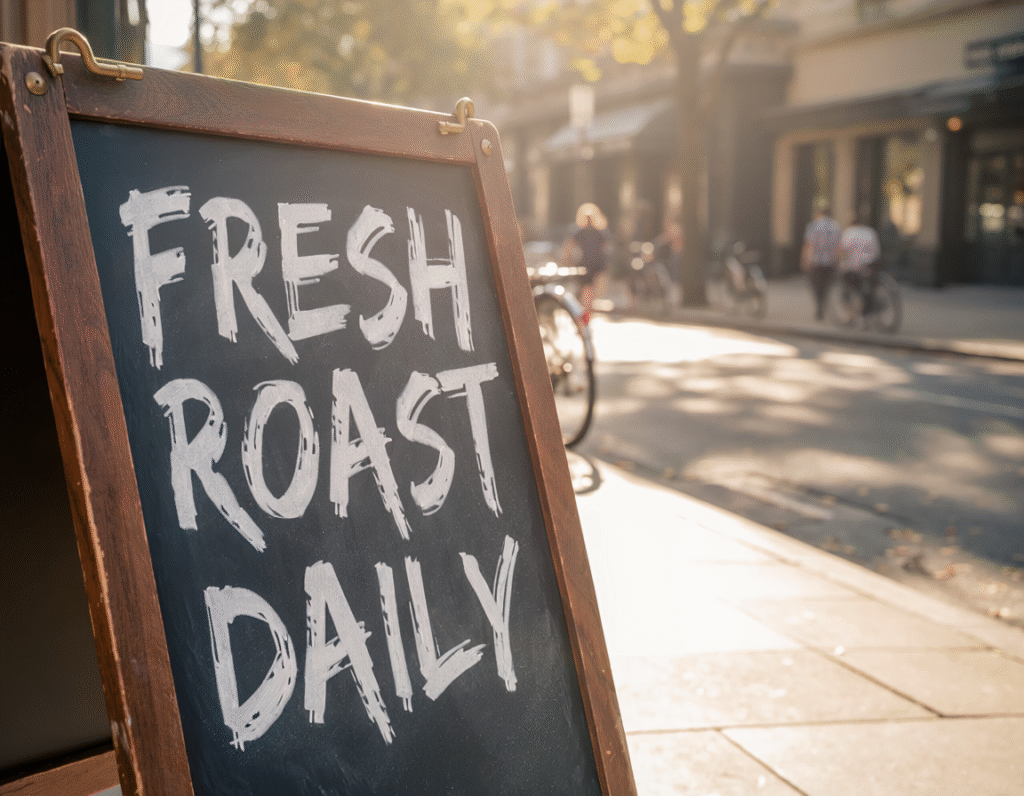
Unlike ChatGPT and Leonardo, Firefly’s generation screen asked me to select a model, aspect ratio, and resolution before anything generated. I chose Firefly Image 5 with settings. It is one extra step that the other tools skip entirely.
What came back had a different quality to it: the same black chalkboard, wooden frame with small brass hardware at the top corners, and accurate “FRESH ROAST DAILY” text, but slightly rougher in texture than ChatGPT or Leonardo’s results. The sign was cropped tightly, bright morning sun flared in from the right, and blurred cyclists and pedestrians filled the background, closer to a magazine editorial shot than a straight product image. It was the most visually dramatic of the five results, which is either exactly what you want or slightly overdone depending on the project.
Free tier: 25 generative credits per month, watermarked output. Standard plan at $9.99/month gives 2,000 credits with no watermark. If you’re already paying for Creative Cloud, Firefly credits are included in your existing plan.
Best for: teams that need commercially safe output with IP indemnification for client or brand work. Firefly is the only tool on this list trained exclusively on licensed and public domain content, which is its core selling point over every competitor here.
Not for: anyone who wants to start generating without choosing settings first.
Ideogram: the text-rendering specialist, with extras you didn’t ask for
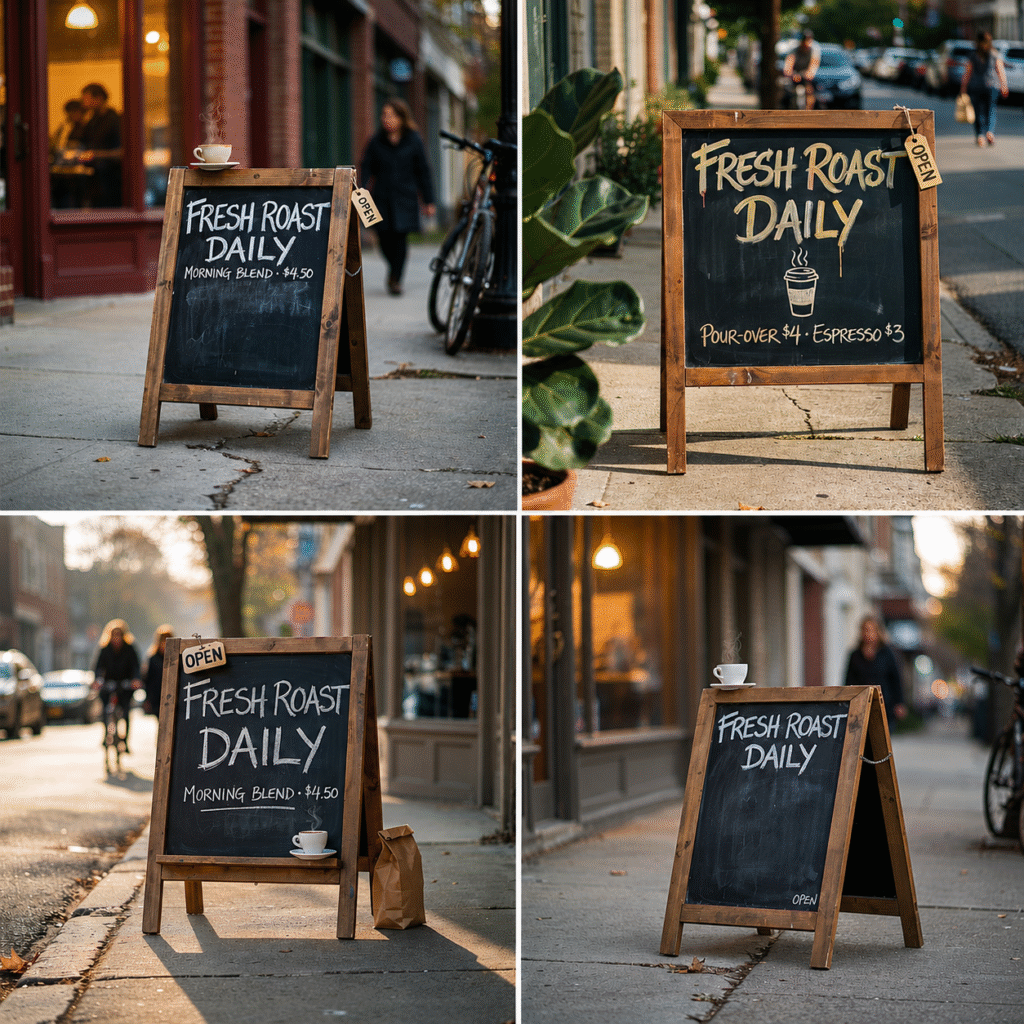
Ideogram is the only tool here that returned four images from one prompt by default, and text accuracy was flawless across all four, exactly what Ideogram is built for.
What surprised me: Ideogram added things to every result that were never in the prompt. A steaming coffee cup sitting on top of the board frame. An “OPEN” tag hanging off the side. Extra invented text like “MORNING BLEND $4.50” and “POUR-OVER $4 ESPRESSO $3” on two of the four. It interpreted the prompt creatively and filled in what it assumed a real coffee shop sign would also say.
Whether that’s a strength or a weakness depends on your use case. For a creative brief where you want the AI to run with an idea, it’s impressive. For a brief where the sign needs to say exactly one thing, you’d need to re-prompt more specifically.
Free tier: free credits included with Google, Apple, or Microsoft sign-in, limited to public generation. Checked directly on Ideogram’s pricing page: Plus is $20/month, or $15/month billed annually (private generation, 1,000 priority credits/month), and Pro is $60/month, or $42/month billed annually (3,500 priority credits/month, batch generation). There is no separate low-cost entry tier between Free and Plus.
Best for: designers who work with text-heavy images regularly, posters, social graphics, packaging mockups. Ideogram is the most reliable text renderer on this list by a clear margin.
Not for: prompts where you need strict control over exactly what appears in the image. Ideogram tends to interpret creatively rather than literally.
Bing Image Creator: the genuinely free option, four results every time
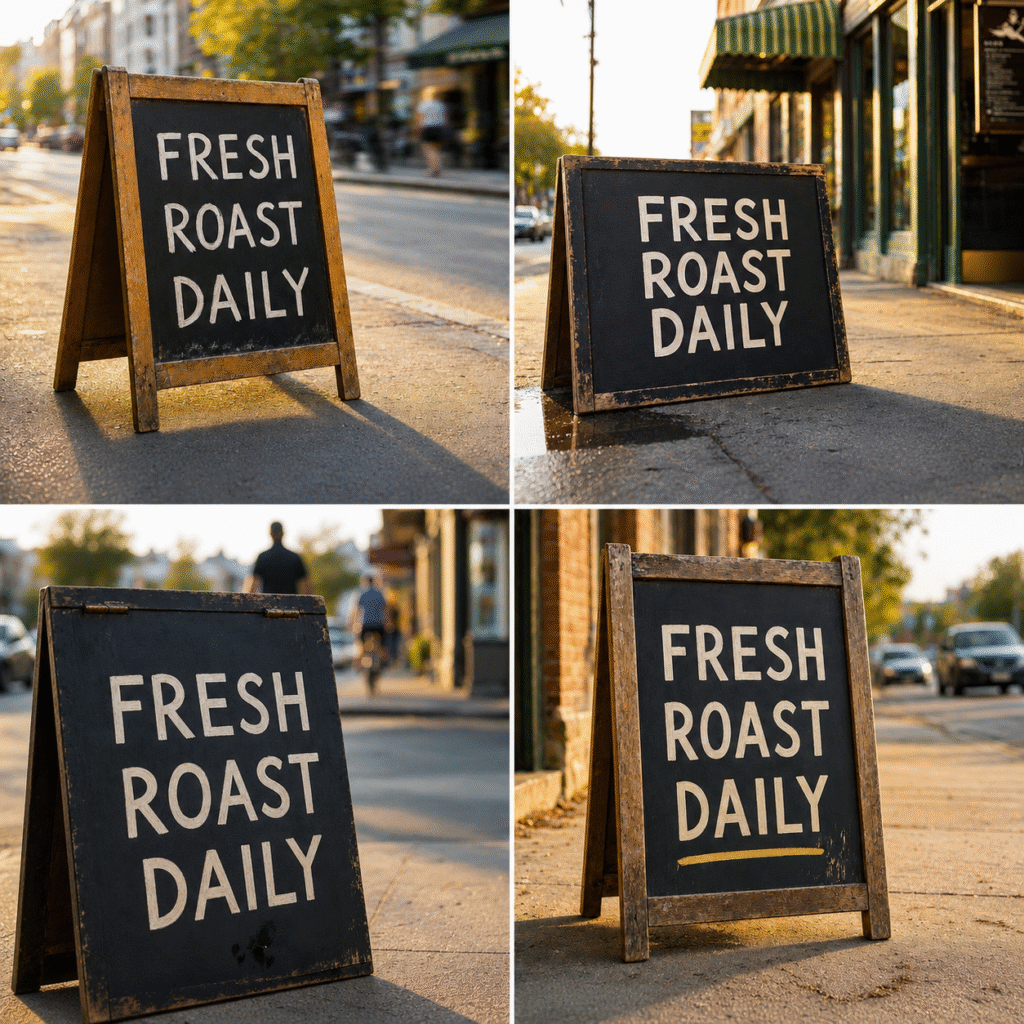
Bing Image Creator also returned four images from one prompt. No account beyond a Microsoft login is required, and there is no paid tier to worry about. It is the zero-friction option on this list.
All four results had accurate text, a stronger showing than most people expect from a free tool with no subscription attached. Each had a different feel: one European and urban with warm golden light, one weathered with cracked paint on a wet autumn street, one an artistic close-up crop, and the cleanest one minimal with cars in the background. Unlike Ideogram, Bing stuck strictly to the prompt: no extra tags, no uninstructed text, no coffee cups added to the frame.
The one honest limitation: there is no path to a paid tier, no private generation option, and daily generation limits apply. For occasional use or a quick one-off image, it is hard to beat. For consistent, high-volume creative work, you will hit the ceiling faster than you expect.
Free tier: fully free, no credit card, just a Microsoft account. Daily limits apply.
Best for: anyone who needs a handful of decent images occasionally and does not want to track a subscription or credit balance.
Not for: professional work requiring private generations or consistent output at volume.
What the text test actually tells you
Every tool here passed the basic test. “FRESH ROAST DAILY” came back legible and correctly spelled across all five tools and all eleven images, a genuinely different result than you’d have seen two years ago, when most of these tools routinely garbled text. Passing the test isn’t the same as performing identically, though. The real difference is what each tool does around the text: ChatGPT and Leonardo stuck closely to the prompt, Firefly leaned cinematic, Ideogram got creatively generous with uninstructed extras, and Bing stayed strict across all four of its results.
If you need video, not just images
One thing this test does not cover: Midjourney itself now generates video from images, producing short animated clips in the 5 to 20 second range. None of the five tools tested here do the same thing. So if the reason you are searching for a Midjourney alternative is specifically because you need video output, the tools above are not the right comparison. A dedicated video-first platform would be a better fit for that workflow.
Common mistakes people make when switching
Real talk for a second: most people do not make a bad tool choice. They make a bad testing choice.
- Judging a tool based on one image instead of testing the specific type of prompt they actually use regularly
- Assuming “free” means the same thing everywhere, when some free tiers make your images public and others just cap the daily count
- Skipping the commercial license check before using outputs in client or brand work, since the terms differ significantly between tools
The bottom line
There’s no single winner among these Midjourney alternatives, and after running this test, that feels like the honest answer rather than a dodge. The right pick depends on one question: what’s the actual thing you need to do? The decision guide below breaks that down by use case.
The tools are genuinely good now, better than most competing roundups give them credit for. The question is just which problem you’re actually solving.
If you want to dig deeper into Midjourney itself before writing it off entirely, our full Midjourney tool listing breaks down its current plans and where it still wins on image quality.
Quick decision guide
- Need text in the image to be accurate – Ideogram or ChatGPT
- Want the most polished, editorial look – Adobe Firefly
- Want a realistic, understated street-scene mood – Leonardo AI
- Need zero-cost images with no subscription – Bing Image Creator
- Already use ChatGPT for other work – start there, no new account needed
- Need commercial safety for client work – Adobe Firefly only
- Actually need video, not stills – look at dedicated video-first tools
Frequently asked questions
Does Midjourney offer a free trial in 2026?
No. As of July 2026, Midjourney is subscription-only starting at $10 a month with no free tier available. This is one of the main reasons people search for alternatives in the first place.
Is there a genuinely free Midjourney alternative with no daily limit?
Not entirely. Every free tool on this list caps how much you can generate. Bing Image Creator is the most accessible, requiring only a Microsoft account, though daily limits still apply. Leonardo AI’s free tier gives 150 tokens per day that reset every 24 hours, which is workable for light daily use.
Which alternative handles text inside images best?
Ideogram was built specifically for text rendering and delivered accurate, legible text across all four of its results in this test. Every other tool also passed in this round, a sign of how much these tools improved in 2026, but Ideogram remains the most reliable pick when text accuracy is the priority.
Can I use these alternatives for commercial projects?
Usually, but the terms differ by platform. Adobe Firefly offers the clearest commercial safety guarantee since it’s trained only on licensed and public domain content. Most others allow commercial use on paid plans but restrict it, or make images public, on free tiers, so check the specific license before client or brand work.
Which tool is easiest for a complete beginner?
Bing Image Creator and ChatGPT are consistently the lowest-friction entry points. Neither requires choosing a model or adjusting settings before generating. ChatGPT requires a free account; Bing requires a Microsoft login.
How does Adobe Firefly differ from the other tools here?
The main difference is commercial safety. Firefly is trained exclusively on licensed Adobe Stock content and public domain material, which means its outputs come with IP indemnification that the other tools do not match. For agencies and in-house teams creating content for clients, that distinction matters.