

Leonardo AI is a generative AI platform focused on creating images, textures, and video content from text or image inputs. It is commonly used by designers, marketers, and content creators to produce visual assets without manual design work.
Users can generate artwork, concept visuals, and marketing creatives, then refine or animate them using built-in tools. The platform fits into workflows where fast visual prototyping, creative ideation, or scalable content production is required. It also supports custom model training for consistent outputs across projects.
Key Features
- Text-to-image and image-to-image generation
- AI video generation from static images
- Real-time canvas editing and inpainting tools
- Custom AI model training for consistent styles
- Image upscaling and background editing tools
- Token-based generation system for usage control
- Team collaboration with shared resources
Pricing
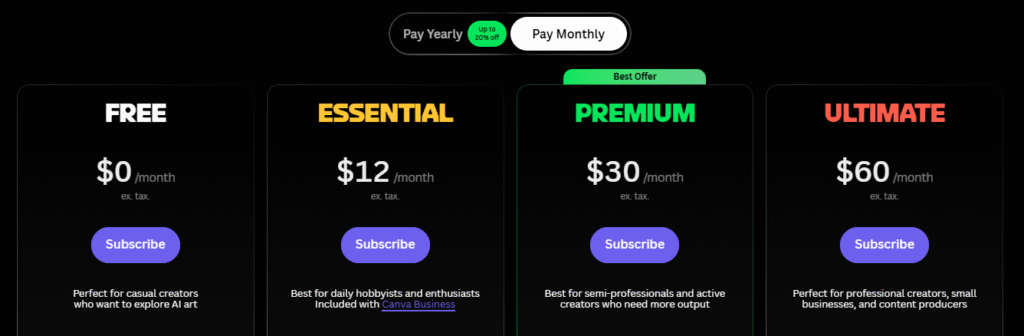
Leonardo AI follows a freemium model with a token-based usage system. A free plan is available with limited daily generations and public outputs.
Paid plans start at around $12/month, with higher tiers available for increased token limits, faster processing, private generations, and access to advanced features such as video generation and model customization.
Pricing scales based on usage and feature access, and exact limits may vary over time. It’s best to check the official site for the latest details.
How People Actually Use It (Typical Workflow)
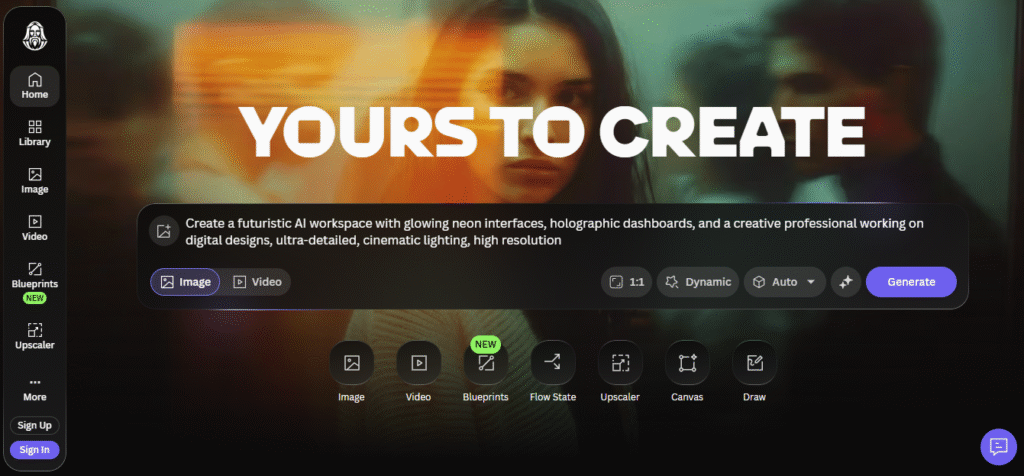
A user starts by entering a text prompt or uploading an image. The system processes the input using selected AI models and generates multiple visual outputs within seconds.
The user then refines the result using editing tools such as inpainting, style adjustments, or upscaling. If needed, they train a custom model to maintain consistent visuals across multiple assets.
Final outputs are downloaded or used directly in workflows such as marketing creatives, game assets, thumbnails, or concept design. In some cases, images are converted into short videos for social media or product visuals.
Pros & Cons
Pros
- Fast generation of visual assets
- Supports both images and video workflows
- Custom model training for consistency
- Free plan available for testing
- Useful for rapid concept creation
Cons
- Token system can be limiting for heavy usage
- Free plan outputs are public
- Learning curve for prompt optimization
- UI and workflow may feel complex initially
- Video output quality can be inconsistent
Who It’s For
Leonardo AI is suitable for designers, marketers, content creators, and small teams that need to produce visual assets quickly. It works well for freelancers, agencies, and startups handling creative work at scale.
It is also useful for game developers and product teams creating concept art or design variations.
Beginners can use the free plan, but users without experience in prompt writing or visual design may need time to get consistent results. It may not suit users looking for simple, one-click design tools.
Is It Worth It?
Leonardo AI is worth considering if you regularly create visual content and want to reduce design time or dependency on manual tools.
For professionals, the paid plans can replace parts of design workflows such as concept creation, thumbnail generation, or asset ideation. This can reduce turnaround time and cost for repetitive creative tasks.
However, value depends on usage. Occasional users may find the free plan sufficient, while heavy users need to manage token consumption carefully to avoid higher costs.
Alternatives
- Midjourney – Strong artistic output and community-driven workflow, but no free plan
- DALL·E – Integrated with ChatGPT, simpler interface, less control over advanced styling
- Stable Diffusion – More customizable and flexible, but requires technical setup
- Canva (AI tools) – Easier for non-designers, less depth in generation control
- Adobe Firefly – Focused on commercial-safe assets and Adobe ecosystem integration
FAQs
1. Is Leonardo AI free to use?
Yes, it offers a free plan with limited daily tokens and public generations.
2. Does Leonardo AI support video generation?
Yes, it can convert images into short video outputs using AI tools.
3. Can I use Leonardo AI for commercial projects?
Paid plans provide ownership and private generation options.
4. What makes Leonardo AI different from other tools?
It combines image generation, editing, model training, and video tools in one platform.
5. Do I need design skills to use it?
Basic use is possible without design skills, but better results require prompt writing and experimentation.