

What is Slite AI?
Slite AI is a company knowledge base that uses an AI assistant called Ask to answer team questions from verified internal documents. It solves the problem of scattered internal information by centralizing docs in one searchable workspace. You can write SOPs, mark them as verified for set periods, and let teammates query them in plain language from Slack or the web.
Key Features
- Ask AI assistant: Answers natural-language questions, capped at 30 queries/user/month on Standard.
- Doc verification system: Set 30-day, 90-day, or 1-year validity windows that auto-trigger review reminders.
- AI editor assistant: Includes 50 responses/user/month for grammar, tone shifts, and translation across 15 languages.
- Slack-native Ask: Surfaces answers inside Slack without forcing a context switch.
- Knowledge management panel: Bulk-edits stale docs and transfers ownership when teammates leave.
Pricing
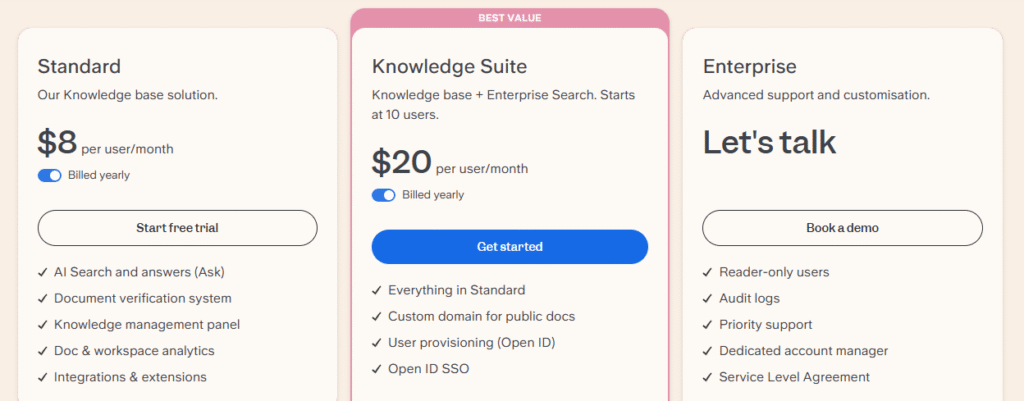
Slite has no permanent free plan. Only a 14-day free trial of the Standard plan. After that, a paid subscription is required. All plans below are billed yearly; monthly billing is also available at a higher per-seat rate.
| Plan | Price (billed yearly) | Price (monthly billing) | Best For | AI Answers (Ask) | AI Editor Assistant | Key Inclusions |
| Standard | $8 per user/month | $10 per user/month | Small to mid-size teams needing a core knowledge base | 30 questions/user/month | 50 responses/user/month | Doc verification, knowledge management panel, doc & workspace analytics, integrations |
| Knowledge Suite | $20 per user/month (10-user minimum) | $25 per user/month (10-user minimum) | Teams needing cross-tool enterprise search via Super | 100 questions/user/month | Included (no published cap) | Everything in Standard + custom domain for public docs, OpenID SSO, user provisioning |
| Enterprise | Custom (contact sales) | Custom (contact sales) | Larger organizations needing compliance and SLAs | Custom | Included (no published cap) | Audit logs, HIPAA, priority support, dedicated account manager, SLA, reader-only roles |
Verify current pricing at https://slite.com/pricing
How It’s Typically Used
For a customer support lead at a 40-person SaaS company onboarding to Slite:
Step 1: Set up the workspace structure. After signing in, you land in a sidebar that already includes “My private channel” (your draft space) and “General [example channel]” (shared with the team). Create new channels around departments or topics – for example, #Support, #Onboarding, #Policies. Slite’s own guidance: one channel per topic, never two parallel channels for the same function.
Step 2: Import existing docs instead of starting blank. Click Import docs in the left sidebar to pull content from Google Docs, Notion, Confluence, or Evernote. This skips the blank-canvas problem and gets your existing macros, SOPs, and runbooks into Slite in one pass.
Step 3: Draft a doc using a template. Open Templates, pick one (e.g., “Standard Operating Procedure”), and write your macro response policy inside it. Templates pin to the top of the channel so the team writes consistently.
Step 4: Mark the doc as verified. Open the doc’s menu, choose Verify, and set a validity window – 30 days, 90 days, 1 year, or custom. When the window expires, Slite auto-pings the doc owner to review, update, or archive it.
Step 5: Connect the Slack integration. Install the Slite app in your Slack workspace. Agents can now query Ask directly in a Slack thread – Slite returns the cited policy with a link back to the verified doc, no context switch required.
Step 6: Track adoption. Use Reported answers and the Knowledge management panel to see which Ask queries returned weak results, which docs nobody reads, and which need refreshing. This is your maintenance loop — without it, even verified docs drift.
Pros & Cons
Pros
- Onboarding is fast, most teams document and search within day one.
- Verification windows prevent silent doc decay, a chronic wiki failure mode.
- Ask returns source-cited answers and respects per-user permissions, so no accidental data leaks.
- Translates docs across 15 languages, useful for distributed teams.
- Imports content directly from Google Docs, Notion, Confluence, and Evernote – no manual migration.
Cons
- Ask only searches inside Slite, cross-tool search requires the $20 Knowledge Suite.
- No offline read or edit mode; cited repeatedly across G2 and Product Hunt reviews.
- Editor formatting is intentionally minimal – no relational databases or complex tables.
- 14-day trial only. Notion and Confluence both offer permanent free tiers.
- Heavy AI users will hit the 30-question/month cap on Standard quickly.
Who It’s For
Best for distributed teams of 10–50 people who need a low-maintenance internal wiki their non-technical staff will actually adopt.
Power users who want relational databases, Kanban views, or heavy customization will find it restrictive.
Anyone building public-facing documentation portals or external help centers should avoid it; Slite is internal-only.
Is It Worth It?
Slite is worth it if you’re a 20-person startup migrating off Google Docs and you’ve watched Notion adoption stall because half the team finds it overwhelming. The verification system alone can pay for itself by cutting “is this still accurate?” Slack pings.
It is not worth it if you already pay for Confluence with Jira, or if you need a single tool that handles wikis, project tracking, and customer-facing knowledge bases. For those use cases, Slite’s narrow scope works against you.
Alternatives
| Tool | Core Strength | Best Use Case | Starting Price | Key Limitation |
| Slite AI | Doc verification + Slack-native AI Ask | Mid-size teams needing a low-maintenance wiki | $8/user/month (yearly) | Internal-only; no public help center |
| Notion | Flexible databases and customization | Teams blending wikis with project tracking | $10/user/month (Plus, yearly) | Full AI requires Business plan at $20/user/month |
| Confluence | Deep Atlassian/Jira integration | Engineering orgs already on Atlassian | ~$5.42/user/month (Standard) | Steep setup curve; storage capped at 250 GB on Standard |
| Guru | AI Source of Truth across 100+ tools | Sales and support teams needing in-app answers | ~$25/seat/month (10-seat min) | 10-seat minimum makes it costly for small teams |
FAQs
Is Slite AI worth it for small teams under 10 people?
Yes, the $8/user/month Standard plan is competitively priced for teams of 5–10. Smaller teams gain the most from doc verification because knowledge decay is hardest to manage when documenting is everyone’s side job.
Does Slite AI offer a free plan?
No, Slite only offers a 14-day free trial of the Standard plan, then requires a paid subscription. This is a key difference from Notion and Confluence, which both offer free tiers for small teams.
Slite vs Notion for a 25-person startup on a budget?
For pure internal documentation, Slite at $8/user wins on adoption speed, non-technical staff use it without training. Notion costs $10/user for Plus but offers far broader use cases if you want one tool to also handle CRMs, OKRs, and project boards.
How many AI questions can I ask per month on Slite’s Standard plan?
Slite’s Standard plan includes 30 AI questions per user per month through Ask, plus 50 AI editor responses per user per month. Knowledge Suite raises Ask to 100 questions per user monthly.
Is Slite AI HIPAA compliant?
Yes, Slite is HIPAA compliant and signs Business Associate Agreements on eligible Enterprise plans. It is also SOC 2 Type II certified and GDPR compliant.