
What is Adobe Firefly?
Adobe Firefly is Adobe’s generative AI platform for creating images, video, audio, and vector graphics from text prompts inside the Creative Cloud ecosystem. It solves the problem of producing commercial-safe AI content for client work, since outputs are trained on licensed material. Designers use it to generate commercially licensed product shots and B-roll without leaving Photoshop or Premiere.
Key Features
- Firefly Image Editor: Removes objects and expands backgrounds inside Firefly with prompt-based control
- Text to Video: Generates 1080p clips up to 5 seconds with cinematic camera and motion controls
- Quick Cut: Auto-generates a first-pass edit from raw clips so editors skip the empty-timeline stage
- Partner Model Hub: Switch between Gemini 3.1 (Nano Banana 2), Veo, Sora, FLUX, and ElevenLabs in one workspace
- Translate Video: Dubs audio into multiple languages with lip-sync, up to 23 minutes on Premium
Pricing
| Plan | Price/Month | Premium Credits | Approx. 5-Sec Video Clips | Key Inclusions |
| Free | $0 | Limited free pool | Very limited | Standard image generation only; no premium models |
| Standard | $9.99 | 2,000 | ~20 | Premium model access, video, audio translation |
| Pro | $19.99 | 4,000 | ~40 | Adds Photoshop + Express (web & mobile) |
| Pro Plus | $49.99 | Not publicly specified | Not publicly specified | Heavier credit pool for video and premium media |
| Premium | $199.99 | 50,000 | ~500 | Unlimited video queue; up to 23 min audio translation |
A 5-second video clip consumes roughly 100 premium credits; longer or higher-resolution outputs cost proportionally more. All paid plans include unlimited standard image generations. Verify current pricing at adobe.com/products/firefly/plans.html before publishing. Adobe runs frequent promotional discounts.
How It’s Typically Used
A marketing designer producing a product launch promo:
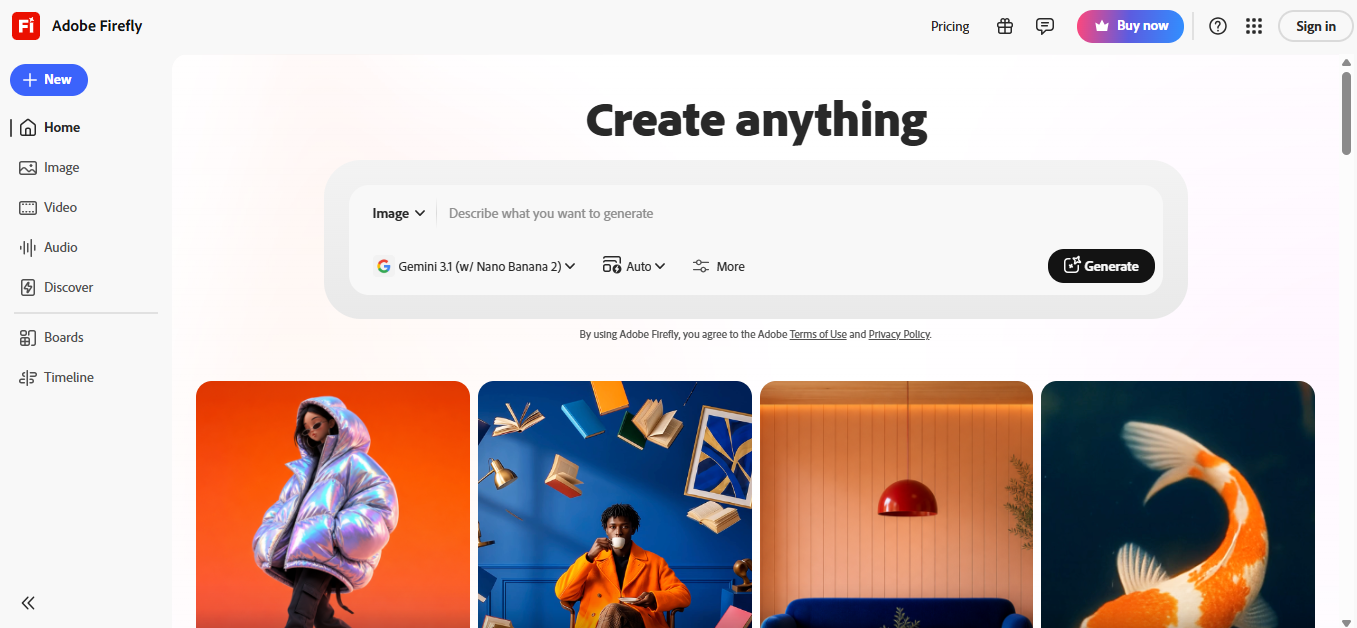
Step 1: Land on the “Create anything” dashboard after signing in
Step 2: Pick the content type: Image, Video, or Audio from the unified prompt dropdown
Step 3: Choose a model. Gemini 3.1 (Nano Banana 2) for stills, Adobe Firefly Video for motion
Step 4: Write a prompt or upload a reference shot, then click Generate
Step 5: Refine inside the Firefly Image Editor or Timeline, or send the output to Photoshop or Premiere via Creative Cloud
Pros & Cons
Pros
- Vector and SVG output integrates directly into Illustrator and brand asset workflows
- Native Photoshop, Illustrator, and Express integration eliminates export-import round trips
- Partner model hub gives access to Veo, Sora, FLUX, and ElevenLabs in one subscription
- Free tier allows real testing before any payment commitment
- IP indemnification available for enterprise customers. Competitors don’t offer this protection
Cons
- Heavy users burn through premium credits fast. Video work especially drains quotas
- Prompt-following precision lags Midjourney and DALL-E 3 for artistic or complex outputs
- Content filters block edgy, historical-war, or medical imagery that competitors permit
- Standalone value drops sharply if you don’t already use Creative Cloud apps
- Complex prompts often require 3–5 regeneration attempts to land a usable output
Who It’s For
Best for: Marketing designers and creative teams already inside Creative Cloud who need commercially safe assets fast.
Limited for: Solo artists chasing maximum visual quality. Midjourney still outpaces Firefly on artistic rendering.
Avoid if: You generate edgy, horror, or politically charged imagery. Firefly’s content filters will block you.
Is It Worth It?
Based on May 2026 pricing verification, official Adobe documentation, and aggregated user reviews from G2 and Capterra, here’s the honest verdict: It is worth it if you run a small agency or in-house marketing team that already pays for Creative Cloud and needs license-clean AI outputs for client deliverables. The Pro plan at $19.99/month pays for itself in stock-image savings within weeks.
It is not worth it if you’re an independent artist or hobbyist without Adobe subscriptions. Standalone, Firefly’s quality-per-dollar trails Midjourney and Leonardo, and the credit ceiling on video makes high-volume work expensive.
Alternatives
Adobe Firefly’s main alternatives: Midjourney, DALL-E 3, Canva Magic Studio, and Leonardo AI. Each beat Firefly on one specific axis: artistic quality, prompt accuracy, ease for non-designers, and style customization, respectively.
| Tool | Core Strength | Best Use Case | Starting Price | Key Limitation |
| Adobe Firefly | Licensed training data + Creative Cloud integration | Marketing teams using Photoshop/Premiere | $9.99/month | Credits drain quickly on video work |
| Midjourney | Artistic image quality and style control | Concept artists, illustrators | $10/month | No native app integration; Discord/web only |
| DALL-E 3 | Prompt-following accuracy and text rendering | Detailed scene composition | $20/month (ChatGPT Plus) | No commercial IP indemnification |
| Canva Magic Studio | All-in-one design + AI generation | Non-designers making social graphics | $13/month | Lower fidelity than Firefly on complex outputs |
| Leonardo AI | Fine-tuned style models and asset libraries | Game and concept art workflows | $12/month | Steeper learning curve than Firefly |
FAQs
Is Adobe Firefly free to use?
Yes, Firefly has a free plan with limited monthly credits and no premium model access. Paid plans starting at $9.99/month unlock 2,000 premium credits and full feature access.
Does Adobe Firefly produce commercially safe content?
Yes, Firefly is trained on licensed Adobe Stock content and public-domain material, making its outputs commercially usable. Adobe also offers IP indemnification for enterprise customers, a guarantee competitors like Midjourney and Stable Diffusion don’t provide.
Is Adobe Firefly worth it for a small marketing team versus Midjourney for the same monthly cost?
For team workflows, yes, Firefly Standard at $9.99/month bundles Photoshop and Express integration that Midjourney lacks. Solo creators prioritizing visual output should pick Midjourney instead.
How many videos can I generate per month with Firefly?
Approximately 20 five-second clips on the Standard plan, 40 on Pro, and up to 500 on Premium. Each 5-second clip consumes around 100 premium credits, and longer or higher-resolution outputs cost proportionally more.
Does Adobe Firefly work without a Creative Cloud subscription?
Yes, Firefly is available as a standalone subscription separate from Creative Cloud. However, users without existing Adobe apps consistently report lower value, since the deepest workflow benefits come from Photoshop, Illustrator, and Premiere integration.
Does Adobe Firefly include access to other AI models like Gemini, Sora, or FLUX?
Yes, Firefly’s Partner Model Hub gives paid users access to Gemini 3.1 (with Nano Banana 2), Google Veo, OpenAI Sora, Pika, FLUX, and ElevenLabs from a single workspace. This is a meaningful differentiator; most competitors lock you to one model family.